
Deployments
See every model that runs on your own compute in one place, whether obleth launches it on Slurm or watches it on Kubernetes.
4 min readUpdated for v2.4.0Edit on GitHub
/deployments?slurm=1)The Deployments page
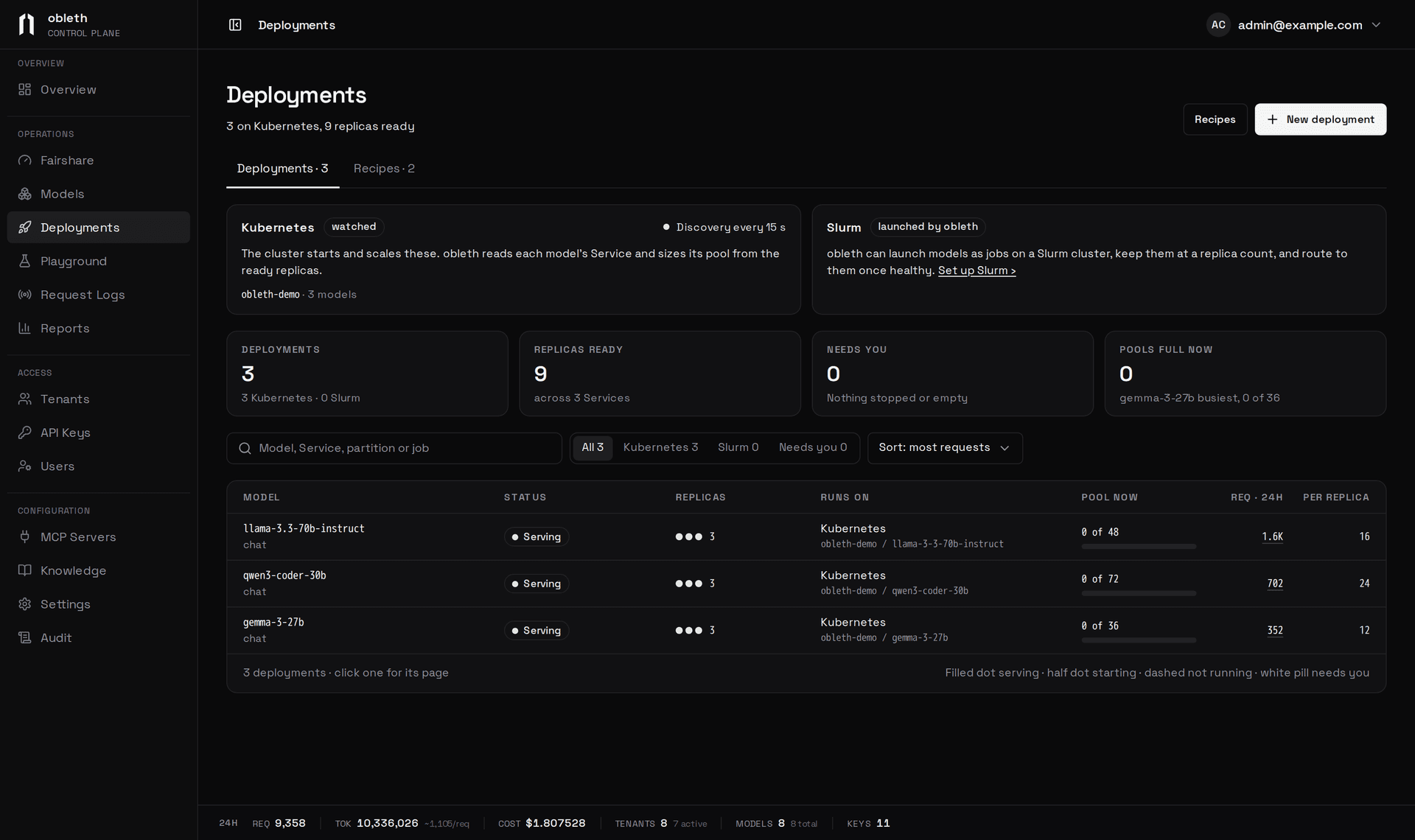
Two kinds of model are listed here:
- Slurm, launched by obleth. obleth submits the model's jobs to a Slurm cluster, keeps it at a replica count and routes to each replica once it is healthy. See Launch on Slurm.
- Kubernetes, watched. The cluster starts and scales the replicas. obleth reads the model's Service and sizes its pool from the ready ones: any model on the
kubernetescapacity source.
A model that only connects to an endpoint you run elsewhere isn't a deployment; it stays on Models.
At the top, a card for each kind shows how it is doing. The Kubernetes card shows the discovery interval and the namespaces in use. The Slurm card shows when the provisioner last checked in and the cluster's idle, busy and down nodes, or a Set up Slurm link. Tiles count the deployments, the ready replicas, what Needs you and the pools that are full now.
The table shows each deployment's status, replicas, where it runs (namespace and Service, or partition and resources), its pool's load, its 24-hour requests (linked to the request log) and the requests one replica takes. Search by model, Service, partition or job, filter to Kubernetes, Slurm or Needs you, and choose a row to open the deployment's page at /deployments/<name>.
New deployment launches a model on Slurm, and the Recipes tab holds what it launches from. See Recipes.
States
| Status | Meaning |
|---|---|
| Serving | Every wanted replica is serving, or, on Kubernetes, the Service has ready replicas |
| Starting | Some replicas are queued in Slurm, with Slurm's reason, or loading |
| Paused | Paused on its page (Slurm), or turned off on Models |
| Stopped | Its failed launches reached the limit, or Slurm refused the job. Needs you |
| Not running | Nothing is running yet; waiting for the provisioner |
| No replicas ready | The Service has no ready replicas. Needs you |
| Not seen lately | Discovery has no current answer for the model, so its pool keeps its last size |
A Slurm deployment's page
The page shows the pool's load, 24-hour requests and failures, and a card per replica: Queued with Slurm's pending reason, Loading while obleth waits for the health path to answer, or Serving. Each card has Restart, which cancels that job and submits a new one.
- Scale. The − and + buttons change how many replicas obleth keeps running.
- Pause and resume. Pause cancels the deployment's jobs and launches none until you choose Resume. Requests fail once the last replica stops.
- Restart all replicas (in the ⋯ menu) cancels every job and submits new ones with the saved settings.
- Remove deployment stops launching the model. Keep the model, which stays on Models with no replicas, or delete it too.
- Script, Placement, Service. The job script, where it runs (partition, nodes per replica, GPUs, CPUs, memory, account, QoS, walltime) and how obleth checks it save together with one save bar. Replicas started after you save use the change; restart the running ones to pick it up now.
- Job logs. On the Script card, the folder where each job writes
<job name>-<job id>.outand.err; use one you can read from a login node. Left blank, Slurm writes them in/tmpon the node the job ran on. #SBATCHlines. Slurm ignores them in a submitted script. When the script has some, the page compares each with Placement and offers Move them to Placement.- Save as recipe. Once the deployment serves, saves its partition, account, QoS, walltime, replica counts and recipe values as a Saved recipe.
When failed launches reach the deployment's limit, the page says obleth stopped launching it, shows what Slurm last said about the jobs that ended, and offers Try once more and Edit the script. See Failures.
A watched Kubernetes model's page
The page shows the ready replicas, the pool's load, an hour of load, 24-hour requests and failures, and recent changes. How obleth sizes it lists the Service, namespace, ready endpoints, per-replica concurrency and headroom, and the pool they make: ready × per replica × headroom. Change opens the model's Capacity settings; see Pool sizes.
obleth doesn't start, stop or scale these replicas: the cluster does.
The Slurm connection
The Slurm connection is a sheet on Deployments: Set up Slurm on the Slurm card (Slurm connection once it's set up), or /deployments?slurm=1. It is no longer in Settings, and old /settings?tab=slurm links open it here. See Connect slurmrestd.