
Alerting
Get a Slack message or an email when a model goes down, an upstream fails, or a budget runs out.
4 min readUpdated for v2.4.0Edit on GitHub
Set up a channel
- 1
Open Settings › Alerts
Until a channel is saved, Needs you at the top of Settings reads Nobody is alerted.
- 2
Add Slack, email, or both
For Slack, paste an incoming-webhook URL. For email, turn on Email and fill in the mail server, sign-in, sender and recipients.
- 3
Set the quiet period and save
The quiet period (default 5 minutes) is how long the same alert is held back after it was sent. Save with the save bar.
- 4
Send a test alert
Send a test alert delivers a message through every saved channel and reports the result per channel. It uses what is saved, so save first.
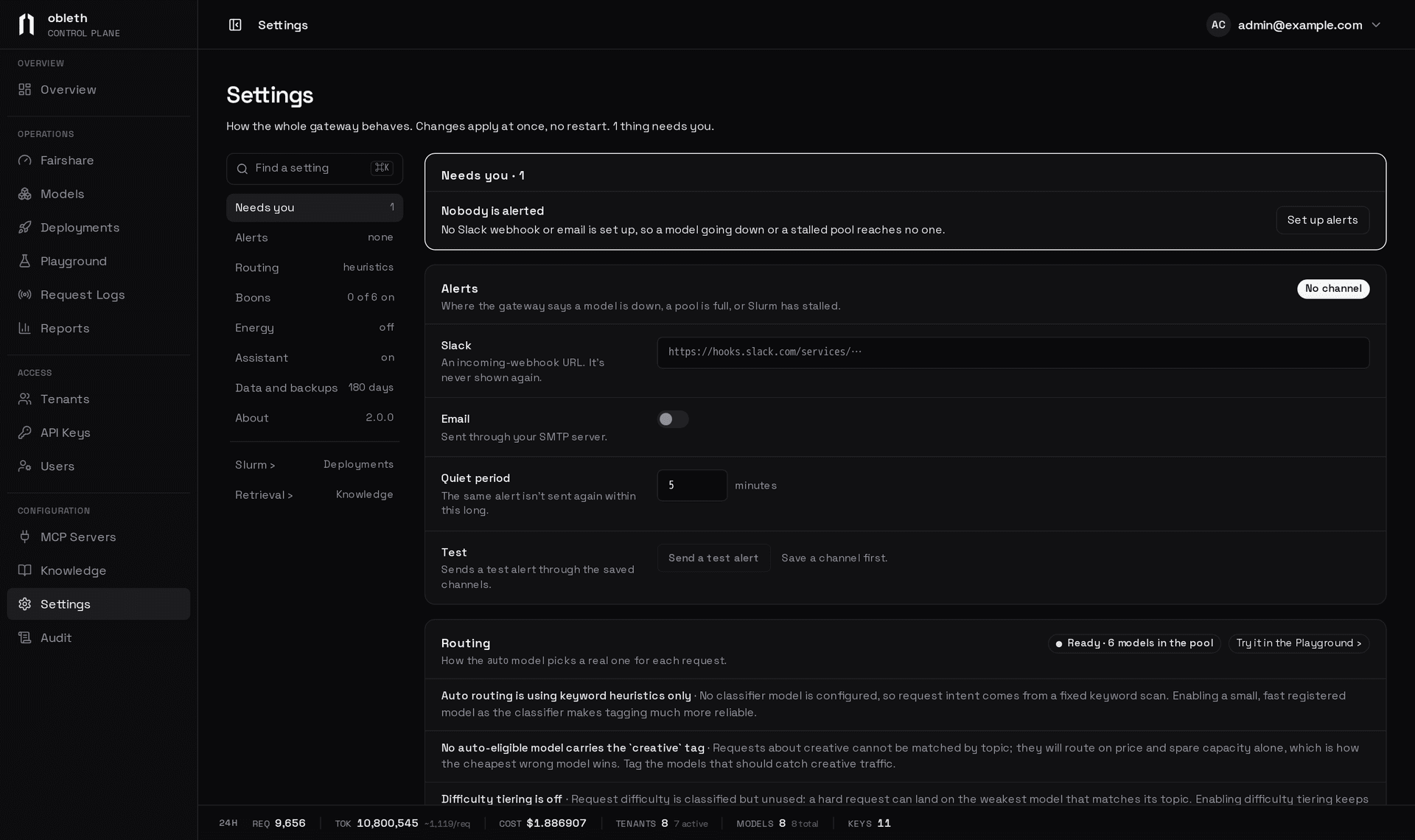
Slack
The webhook URL is write-only. Once saved, the field reads (set); type a new URL to replace it, or turn on Remove the stored webhook and save. The gateway posts to the URL itself, so it is checked against the same outbound policy as a model's api_base: a URL that resolves to a link-local or cloud metadata address is refused on save. See Security.
| Field | Notes |
|---|---|
| SMTP host and port | Port defaults to 587 |
| STARTTLS | On by default. Off sends the message, and the SMTP username and password if set, unencrypted |
| SMTP username and password | Leave blank for a relay that needs none. The password is write-only; turn on Remove the stored password to clear it |
| From address | One sender |
| Recipients | Separated by commas or new lines |
Saving with Email off deletes the server settings and the stored password.
What triggers an alert
Each message names its Issue, the key the quiet period is counted against. Keys ending in an id are held back per model, tenant, key or issuer.
| Issue | Raised when |
|---|---|
model_health_down:<model>, model_health_recovery:<model> | A model crosses its health-failure threshold, or recovers. See Health checks |
upstream_request_failed, upstream_5xx_response | Every upstream attempt failed, or an upstream returned a 5xx to the client |
upstream_stream_error | An upstream response broke off or went silent past the read timeout before it was complete, or a chat or text completion stream closed with neither [DONE] nor a finish reason. Not raised when the tool loop or the speculation boon runs the stream. See When a stream is cut short |
upstream_error_event | An upstream reported an error inside a 200 response: an error event in its stream, an error body, or a generation it ended with finish_reason error or abort. Errors that carry a 4xx code are not alerted |
scheduler_unavailable | The fairshare scheduler could not be reached |
term_budget_warn:<tenant>, term_budget_exhausted:<tenant> | A tenant reaches 80% of its term budget, or uses it up |
key_term_budget_warn:<key>, key_term_budget_exhausted:<key> | The same for a key's own budget |
tenant_expiry:<tenant> | A tenant's access ends within 72 hours |
redis_* (for example redis_key_lookup_failed, redis_budget_reserve_failed_open) | A Redis error on the request path. See Reliability |
guardrails_input_<tenant>, guardrails_output_<tenant>, and the _harm_ variants | A log_only guardrails policy flagged a request or response |
mcp_upstream_request_failed, mcp_upstream_5xx_response, mcp_tool_discovery_failed | An MCP server call or tool listing failed |
jwks_fetch_failed:<issuer>, identity_provision_failed:<issuer>, identity_tenant_created:<issuer> | An identity-token issuer's keys could not be refreshed, a key could not be created for a verified token, or a missing tenant was created |
slurm_reconcile_held, slurm_reconcile_recovered | The Slurm provisioner has gone 10 minutes without a successful reconcile while Slurm is on, or recovered |
energy_power_poll_failed | The energy per-node Prometheus query failed |
energy_model_power_poll_failed | The energy per-model Prometheus query failed |
energy_model_requests_poll_failed | The energy requests-per-model Prometheus query failed |
video_job_lookup_failed | A video job record could not be read |
A delete or disable whose Redis eviction fails is not an alert: the call itself returns 502. See Troubleshooting.
Management API
| Method | Path | Does |
|---|---|---|
GET | /api/v1/settings/alerts | Current settings. Reports slack_webhook_set and email.password_set instead of the secrets |
PUT | /api/v1/settings/alerts | Update the settings; applies at once |
POST | /api/v1/settings/alerts/test | Send a test alert on every saved channel |
The quiet period is min_interval_secs; omitted, it keeps its value. On PUT, omit slack_webhook_url or email.smtp_password to keep the stored value, and set clear_slack_webhook or email.clear_smtp_password to true to remove it. Omitting email turns email off.
curl -X PUT http://localhost:9180/api/v1/settings/alerts \
  -H "Authorization: Bearer $OBLETH_ADMIN_TOKEN" \
  -H "Content-Type: application/json" \
  -d '{
    "slack_webhook_url": "https://hooks.slack.com/services/T000/B000/XXXX",
    "min_interval_secs": 300,
    "email": {
      "smtp_host": "smtp.example.com",
      "smtp_port": 587,
      "from_address": "alerts@example.com",
      "recipients": ["oncall@example.com"],
      "starttls": true
    }
  }'
How delivery works
Settings are stored in Postgres and loaded at start. Alerts are sent from a background task, so delivery never delays a request. Before any settings are saved, OBLETH_SLACK_WEBHOOK_URL and OBLETH_SLACK_ALERT_MIN_INTERVAL_SECS (default 300) seed the Slack channel; once you save in the dashboard or through the API, the saved settings win and the variables are ignored.