
First tenant and key
Create a tenant, give it an API key and a model to call, and check that the request was admitted, billed and logged.
3 min readUpdated for v2.4.0Edit on GitHub
A tenant is who gets a share of capacity: it carries the fairshare weight, group, limits and budgets. A key belongs to one tenant and is what a client sends. There is no shared or open key; every client needs its own key or an identity token. The admin token (OBLETH_ADMIN_TOKEN) only works on the management API, never for inference.
In the dashboard
- 1
Add a tenant
Open Tenants and choose Add tenant. A name is enough; the weight defaults to 100 and every limit is off. You can change all of it later on the tenant's page.
- 2
Create a key
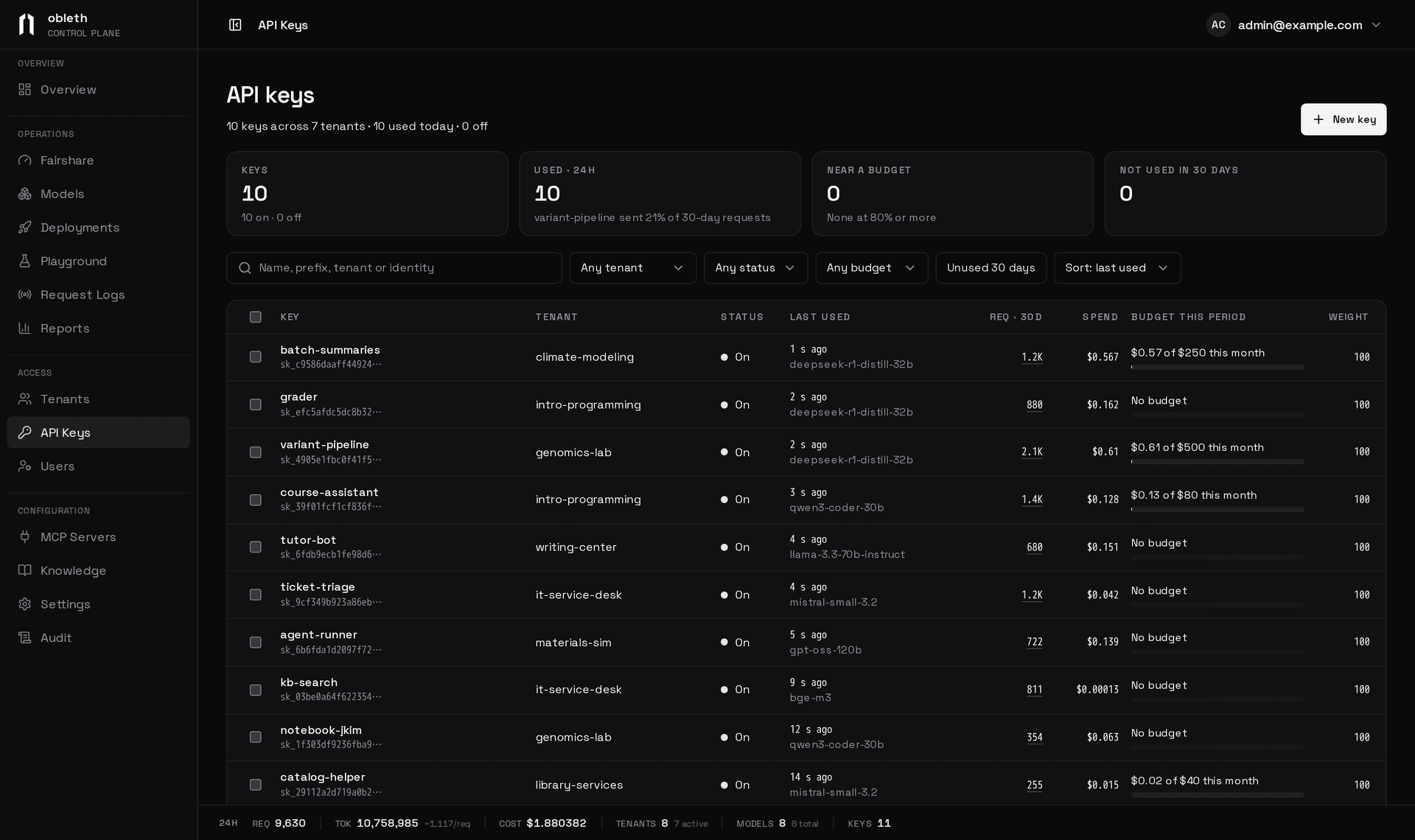
Open API Keys and choose New key, or New key on the tenant's page. The secret appears once in a banner with Copy and Copy as OPENAI_API_KEY=…. Store it now: only its hash is kept.
- 3
Make sure there is a model to call
Add one on the Models page if you haven't; see Model registry. Models added in the dashboard start switched off and turn on when their first health check passes.
With the management API
- 1
Create a tenant
TOKEN=dev-admin-token      # your OBLETH_ADMIN_TOKEN
API=http://localhost:9180/api/v1

TID=$(curl -s -X POST $API/tenants \
  -H "Authorization: Bearer $TOKEN" -H "Content-Type: application/json" \
  -d '{"name":"my-team","weight":200,"tokens_per_minute":500000}' | jq -r .id)
Field Default Meaning namerequired Unique tenant name weight100Fairshare weight against other tenants in its group fairshare_groupdefaultThe group it competes in tokens_per_minute0(no cap)Per-minute token rate max_in_flightnone Cap on this tenant's running requests, applied per model syntheticfalseMarks test or benchmark traffic, left out of usage reports Schedules, budgets, model lists and guardrails are set afterwards; see Tenants and keys and Quotas and rate limits.
- 2
Mint a key
SECRET=$(curl -s -X POST $API/tenants/$TID/keys \
  -H "Authorization: Bearer $TOKEN" -H "Content-Type: application/json" \
  -d '{"name":"prod"}' | jq -r .secret)
The response is
{"key": {…}, "secret": "sk_…"}. Optional fields:description,weight(default 100, shares the tenant's slots among its keys),max_in_flight(per model), and a key budget (budget_tokens,budget_cost_usd,budget_period). See API keys. - 3
Register a model
curl -s -X POST $API/models \ -H "Authorization: Bearer $TOKEN" -H "Content-Type: application/json" \ -d '{"model_name":"my-model","upstream_model":"my-model","api_base":"http://my-model-server:8000/v1"}'upstream_modelis the name the backend expects;api_baseis its base URL. Skip this if the model exists. - 4
Send a request
curl -s http://localhost:8088/v1/chat/completions \
  -H "Authorization: Bearer $SECRET" -H "Content-Type: application/json" \
  -d '{"model":"my-model","messages":[{"role":"user","content":"Hello"}],"max_tokens":32}'
Use your data-plane address: port 8088 on the Compose stack, port 8080 of the gateway Service on Kubernetes, or your load balancer.
Check that it worked
- Request Logs in the dashboard shows the request with its tenant, key, tokens and timing. With the API:
GET /api/v1/usage/logs. - Audit shows the tenant and key you created. With the API:
GET /api/v1/audit. - Fairshare shows the model's pool and the tenant's share while requests run.
If the request fails, the status tells you where: 401 is the key, 403 a disabled key or model or a tenant outside its allowed models or hours, 404 an unregistered model. See Troubleshooting.
What each step stored
| Step | Where |
|---|---|
| Tenant and key | Postgres (tenants, api_keys), with an audit row each |
| Key lookup entry | Redis, obleth:key:<hash>, holding the tenant's and key's weights and limits |
| Per-minute token bucket | Redis, obleth:budget:<tenant id> |
| Usage row | ClickHouse, usage |
Minting a key writes the hash to Postgres, pushes the resolved key to Redis and publishes an invalidation so every gateway replica drops any stale copy. Creating a tenant writes only Postgres; its settings reach Redis inside each of its keys. If Redis loses an entry, the gateway re-pushes every key from Postgres every OBLETH_REDIS_REWARM_SECS (300 s) and on reconnect. See Request lifecycle for what happened to the request.
Querying the ledger directly (Compose)
docker compose exec clickhouse clickhouse-client --user obleth --password "$CLICKHOUSE_PASSWORD" \
  --query "SELECT tenant_id, model, admission, input_tokens, output_tokens, total_ms
           FROM obleth.usage ORDER BY ts_ms DESC LIMIT 5"
A request admitted without waiting shows admission = 'fast'.