
Workspaces
Let the model build, run and fix code in a private Linux machine, with the app it makes in a live preview next to the chat.
5 min readUpdated for Chat 0.5.2Edit on GitHub
Build something by chatting
Give a chat a workspace with the composer's Workspace button and describe what you want. If you ask for something that needs one in a chat without it, the model asks first: its reply ends with Turn on workspace, which starts the workspace and carries on with your request.
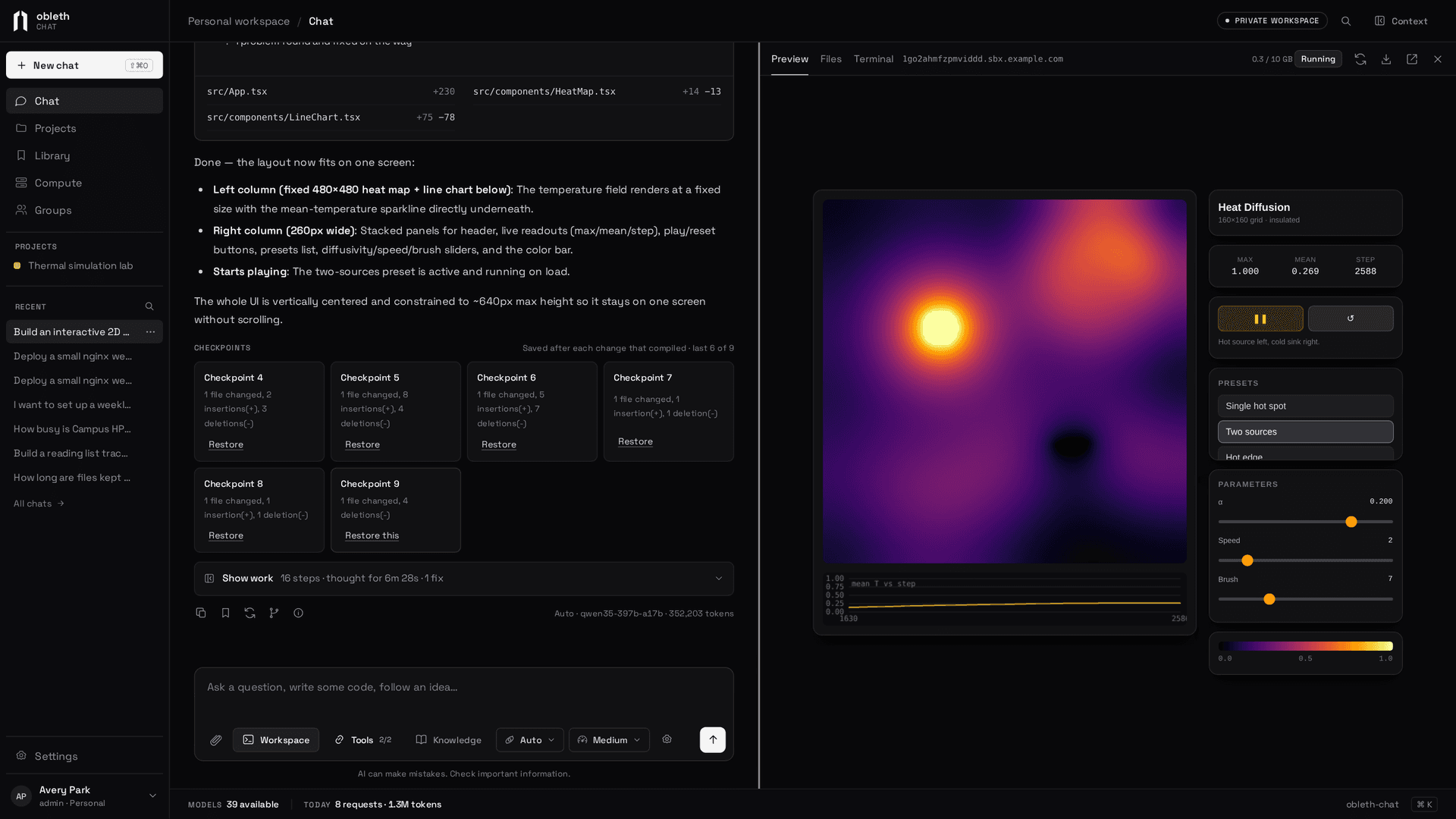
Describe what you want: "an interactive heat diffusion simulator with a color map, presets and sliders". The model plans the files, writes them, starts the dev server and checks that the page compiles. The running app appears in the Preview pane beside the chat. Ask for a change, and the preview updates.
Without a stated preference, the model builds with Vite, React and Tailwind CSS, and uses Next.js when you ask or when the app needs server code. A plain HTML site with no build step is served as it is, with a syntax check on its scripts.
Workspaces aren't only for web apps or JavaScript. The image has Python 3 with numpy, pandas, matplotlib, scipy, scikit-learn, pytest, JupyterLab, Flask, FastAPI and uv, plus Rust (with clippy and rustfmt), Go, gcc, g++ and make, so scripts and class assignments run too. The Files tab shows images and CSV tables, and can open any HTML file in the preview.
The preview shows any web server, in any language: a Flask, FastAPI, Streamlit or Gradio app, an axum or actix service in Rust, a Go server, or a Jupyter notebook. Terminal apps, such as a ratatui, curses or Textual interface, a game or a REPL, run in the Terminal tab: the model builds and tests the app, then opens it there for you to use with the keyboard, and the step offers Run again. Desktop windows (Tkinter, Qt, pygame) can't be shown yet, so the model offers a terminal or web version.
Explore a repository
Paste a public repository's address and ask about it: "explain this codebase to me", "check it for issues". Explore a repo on the home page starts such a chat with a workspace. The model clones the repository into repos/ (workspaces reach public HTTPS addresses) and reads it, or sends worker agents to read parts of it at once. Private repositories can't be cloned yet.
Follow the work
While the model works, one live card shows what it's doing now, the file it's typing, its latest thought, the files it planned and its recent steps.
- Steer sends a note that the model reads at its next step, without stopping it. A note it never reached goes back to the composer.
- Approvals for tools that change things outside the workspace appear in the card. See Connections.
When it's done, a result card lists the files changed with their line counts, whether the preview compiles and the problems it found and fixed, with Open preview, Files and Download.
Show work opens the full trace, grouped into phases (Plan, Explore, Build, Run). Each thought sits before the step it led to. Failed exploration folds into one dead-end line, and a failure with its fix becomes one problem card. Filters show only thinking, files, commands or problems.
Checkpoints
After each round of changes that left the app compiling, Chat saves a checkpoint of the project. Restore one from the result card: Chat saves the current state first and offers Undo. Installed packages stay as they are. Checkpoints are kept outside the project folder, so your own git history and downloads are untouched.
The workspace itself
The pane's Terminal tab is an interactive shell in the project folder. In a project chat, the Git tab saves and syncs the code with the project; see Project code. Download gives the project as a zip without dependencies or build output, and the pane shows how much of your disk is used.
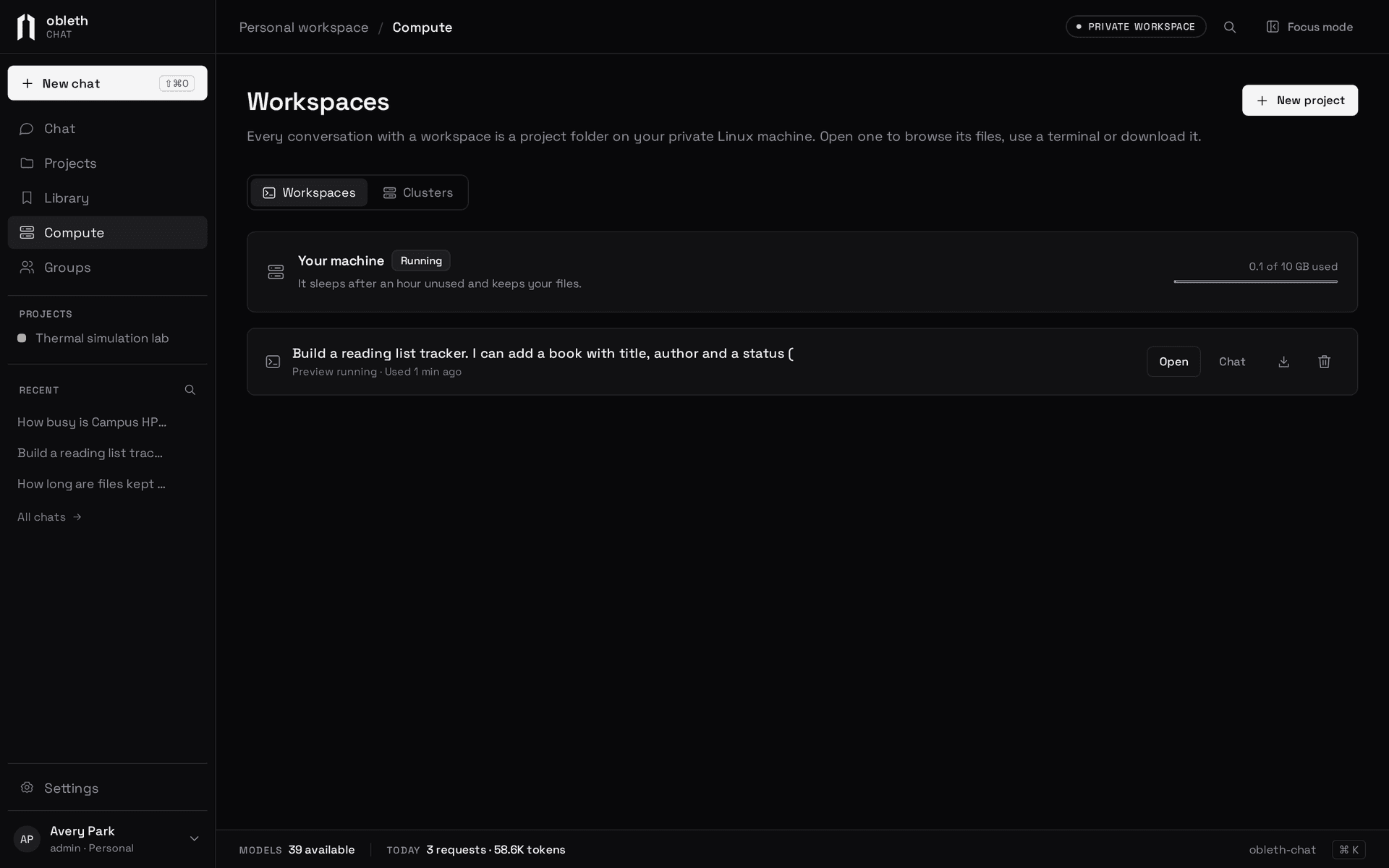
Compute › Workspaces lists every project with its last use, the machine's state and disk use. Open one full width with the same tabs, download it or delete it.
An AGENTS.md in a project adds notes the model reads at the start of each turn, with today's date and the project's file list. To change how the model works everywhere, replace its working instructions in Settings › Personal › Workspace agent.
Long turns
A turn runs on the server as long as the model keeps answering, and keeps going if you close the tab. It pauses, rather than fails, when the model sends nothing for 10 minutes, or at 100 tool steps or 3 hours. Say "continue" to resume.
A chat in Auto mode has no step or time limit: it runs until the model finishes or you choose Stop. A request the model doesn't answer within 10 minutes is retried twice before the turn pauses. To keep the model's context bounded, it sees the latest 150 steps in full, the oldest file contents and outputs in those steps are shortened, and earlier steps are left out. Files, runs and the research tree hold the state, so the model checks them instead. Turning Auto mode off during a turn brings the 100-step limit back.
Auto mode also keeps a turn going without you:
- It outlives your sign-in. The turn doesn't end when your browser session expires or you sign out. Stop ends it, as does an administrator disabling your account.
- A stopped turn is nudged. If the reply stops before finishing (Chat restarted, the gateway failed, the model stalled or reached a size limit), or finishes while research runs are still going, Chat sends the model a short Auto mode note to carry on. The first comes after a minute; later ones wait longer, up to 30 minutes apart. After 10 in a row that make no progress, Chat leaves the chat for you. A reply you stopped is never nudged, and only chats active in the last 12 hours are.
Your machine stops after 60 minutes idle, with your files kept, and starts again when you use it. A project's dev server stops after 30 minutes unused and starts again when you open its preview. Your volume is deleted 7 days after you last used it.
How previews are isolated
Each project's preview has its own origin (<id>.<preview domain>), so the app's code can't run on Chat's origin or read your session. Previews open only for you, through a cookie minted from a one-minute ticket. The terminal accepts connections only from Chat's own origin.
What the model sees
The model's prompt has two parts: facts Chat owns about the workspace (folder, port, servers, preview) and working instructions (explore before editing, follow the project's conventions, verify, keep replies short). read_file returns numbered lines in windows that fit one tool result, and edit_file tolerates indentation differences and copied line numbers. Later turns replay each answer with a short list of its tool steps, not the full output, because the workspace holds the state.
Administrators turn workspaces on and decide who gets one; see Enable workspaces.