
Conversations
Pick a model, set the thinking effort, edit and branch, share a chat, and find past chats.
5 min readUpdated for Chat 0.5.2Edit on GitHub
Send a message
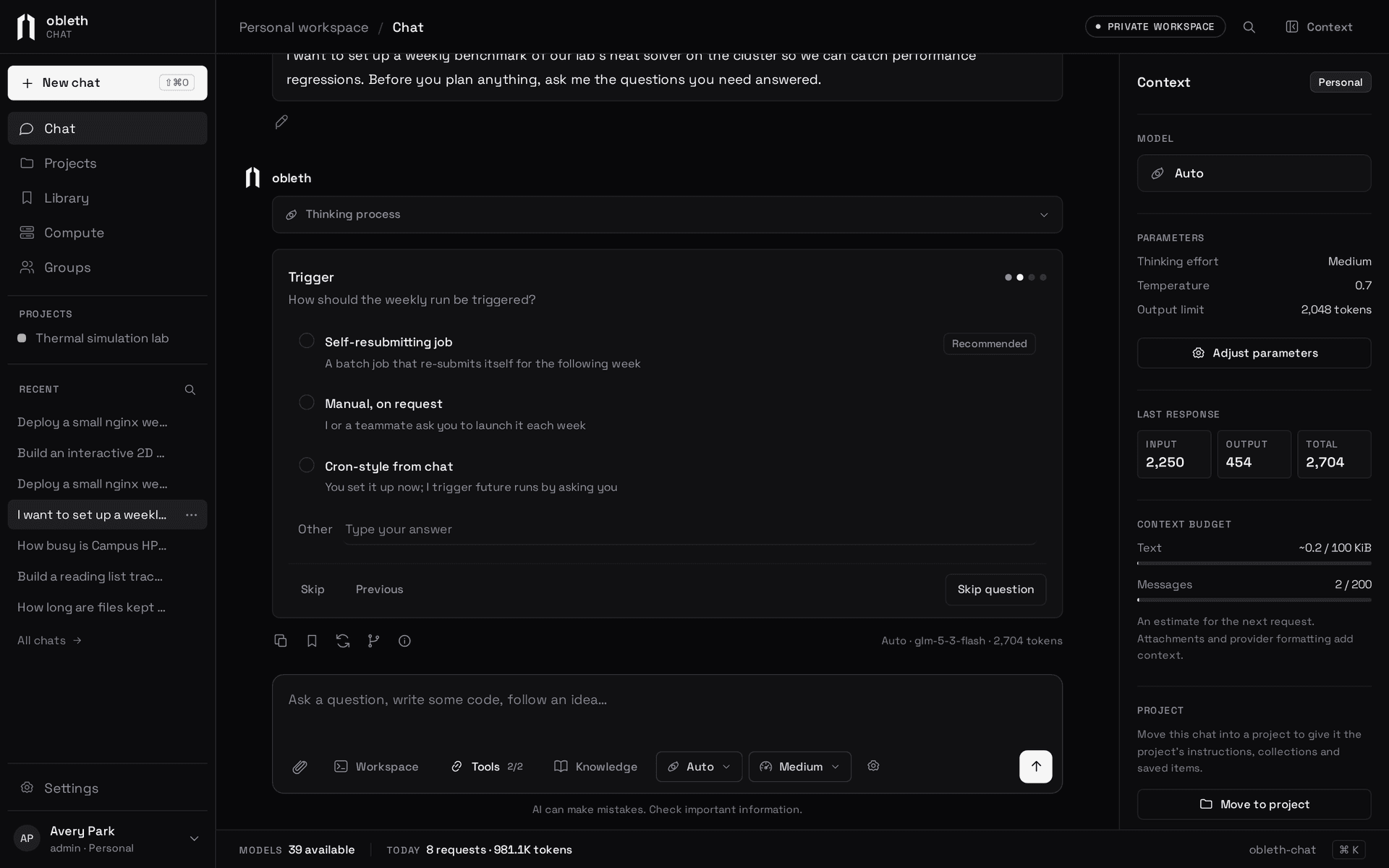
Type in the composer and press Enter. Under the box, + attaches files or adds Knowledge collections, and the dock switches the workspace, the browser and tools on for this chat; the ones that are on light up and show their names. The model pill on the right picks the model and the thinking effort, and the ring around the send button shows how much of the model's context the chat uses.
- Model. The picker lists the models your administrator published for you. The model you pick becomes your default for new chats. Auto sends
model: "auto", and the gateway picks a model for each message from its Auto-eligible models, filtered by what the message needs (tools, images, context length). The model that answered is shown on the reply. See Auto routing. - Thinking effort. Set in the model pill's popup and shown as bars on the pill: None, Low, Medium or High, passed to the model as
reasoning_effort. With Auto, None and Low also steer the router toward a lighter model, and High toward a stronger one. Models that don't support a level may ignore it. - Parameters. Temperature, the output limit and instructions are the last row of the model pill's popup. Your administrator sets the defaults and may lock some of them. By default there's no output limit, so the model's own applies; 0 means none.
Chat details
Under the chat's title, the project pill moves the chat into a project or starts a project from it, and the knowledge pill picks the collections it searches.
Everything else about the chat is in the Details tab of the side pane: how much context it uses (messages, and the tools, instructions and pages sent with them, as of the last request the latest reply sent), the model and parameters with Adjust, its project, knowledge and tools. Open it from Details in the top bar, the hover card on the send button, the project pill's menu, or ⌘ .. It opens beside the chat, next to the workspace's and browser's tabs, so it never covers what you're reading.
A reply streams in as it's written. When the model thinks out loud, its thinking goes in a collapsible panel above the answer. Thinking is saved, but only the answer is sent back to the model on later turns. A reply that ran out of tokens while thinking says so and suggests a higher output limit or a lower effort.
A reply that uses tools is several requests to the model, one per step. Its details show the total tokens over all steps, and the context meter shows the size of the last one.
A model can hand parts of a task to faster worker agents that run at the same time; ask for agents, sub-agents or work in parallel.
Your usage
Settings › Personal opens with your last 30 days: requests and tokens, a chart of input and output tokens per day, which models they went to, and how much of today's allowance is left. Hover a day for its numbers, or open Show as a table. Days run in UTC, and allowances reset at 00:00 UTC.
While it answers
Responses run on the server. Close the tab, reload or switch chats, and the response keeps going; open the chat again and it picks up where it is. Stop ends only the response you see, never a newer one. You can run one response per chat and three at once by default.
When an answer finishes, Chat may offer three follow-up prompts under it. Click one to send it.
A model with tools can also ask you questions with ask_user. The reply ends with a card of one to four questions, each with a few options, one sometimes marked recommended. Step through them, pick options or write your own, and Submit answers sends them as your next message. Typing a message instead answers in your own words.
Edit, retry and branch
- Edit a message and send it again, or Regenerate a reply. Both create a new version in the same chat. The previous and next arrows step through versions and bring back the turns that followed each one.
- Branch copies the chat up to a message into a new conversation.
- Generation details under a reply shows the model that answered, the parameters it used, token counts, the finish reason and, for a failure, why it failed.
Share a chat
The link button in a chat's header, or Share… in its options menu, shares it read-only:
- Only you: nobody else can open it.
- A group: members find it on the group's page.
- Anyone signed in with the link: every account here can open it from Copy link.
The link is the chat's own address. People you share with read it as it grows and open its files and images. They see the model, its settings and each tool step with what it returned, but not your instructions. Fork to continue copies it into a chat of their own, with its own copies of the files and the model and its settings, but not your instructions. Everything that changes the chat stays yours, and its workspace, browser and connections are never shared. Choosing Only you, or deleting the group, ends access at once.
Find past chats
All chats searches titles and message text, and lists pinned chats first. Select several to archive, delete or export them together. Export writes portable JSON with the selected transcript and the bytes of its files; Import brings it back as new private chats. One export or import holds up to 50 conversations and 10 MiB.
Limits
| Limit | Value |
|---|---|
| Conversations per person | 1,000 |
| Messages in the selected transcript | 200 |
| Stored messages per conversation, including versions | 1,000 |
| One message you send | 12,000 characters |
| System prompt | 8 KiB |
| Text context sent to the model | 100 KiB, plus 20 MiB of images |
| One answer and its thinking | 1 MiB |
| Everything stored for one conversation | 4 MiB |
| One generation | 9 minutes. A turn with tools pauses after 100 steps or 3 hours |
Context that's too large is refused, not silently cut. Daily request and token allowances reset at 00:00 UTC; see Models, groups and limits.
How a response survives a reload
Progress is saved to Postgres about every 750 ms, or every few seconds once a response passes 32 KiB. The replica that streams it renews a 45-second lease; if it disappears, the response is marked interrupted the next time it's read. Stop, sign-out and a graceful shutdown save partial output. A hard crash can lose the tokens since the last save.