64 docs indexed
First Tenant & Key
A complete walkthrough of creating your first tenant, minting an API key, and verifying the setup through all three datastores.
This walkthrough creates a tenant, mints a key, makes a test call, and explains exactly what happened in each datastore.
Prerequisites: obleth is running — Docker Compose (docker compose ... up -d) or Kubernetes (helm install + port-forward to :9180). See Quick Start or Installation.
Not like bifrost (or other single-key gateways)
obleth has no open virtual key. Every client must authenticate with a
tenant-scoped API key (sk_...):
- Create a tenant (
POST /api/v1/tenants) — the fairshare identity. - Mint a key for that tenant (
POST /api/v1/tenants/{id}/keys) — secret shown once. - Call the data plane with
Authorization: Bearer <tenant-key>.
The admin token (OBLETH_ADMIN_TOKEN) is separate — it only authorizes
Management API requests (:9180), not inference traffic.
1. Create a tenant
A tenant is the fairshare identity — it holds the weight, quota, and group assignment.
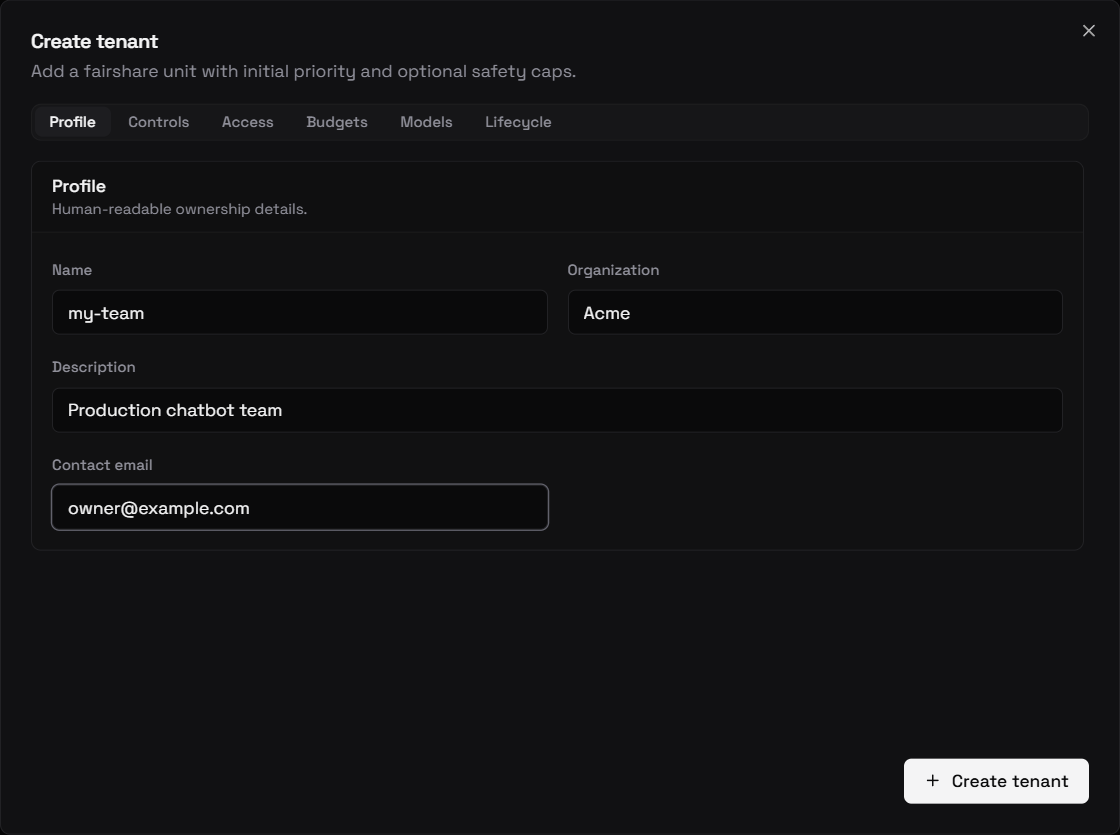
You can create one from the control plane's Tenants → Add tenant dialog, which exposes the same fields (profile, fairshare controls, access windows, budgets, model allowlists) across tabbed sections:
Or call the Management API directly:
TOKEN=dev-admin-token

curl -s -X POST http://localhost:9180/api/v1/tenants \
  -H "Authorization: Bearer $TOKEN" \
  -H "Content-Type: application/json" \
  -d '{
    "name": "my-team",
    "weight": 200,
    "tokens_per_minute": 500000
  }' | jq .
Expected response:
{
  "id": "550e8400-e29b-41d4-a716-446655440000",
  "name": "my-team",
  "fairshare_group": "default",
  "weight": 200,
  "tokens_per_minute": 500000,
  "max_in_flight": null,
  "created_at": "2026-01-15T10:00:00Z",
  "updated_at": "2026-01-15T10:00:00Z"
}
Save the id:
TID=$(curl -s -X POST http://localhost:9180/api/v1/tenants \
  -H "Authorization: Bearer $TOKEN" \
  -H "Content-Type: application/json" \
  -d '{"name":"my-team","weight":200,"tokens_per_minute":500000}' \
  | jq -r .id)
echo $TID
What happened: The Management API wrote a row to tenants in Postgres, then synced a ResolvedKey skeleton to Redis and published an invalidation to all pods.
2. Mint an API key
SECRET=$(curl -s -X POST "http://localhost:9180/api/v1/tenants/$TID/keys" \
  -H "Authorization: Bearer $TOKEN" \
  -H "Content-Type: application/json" \
  -d '{"name":"prod"}' \
  | jq -r .secret)
echo $SECRET
The secret looks like sk_a1b2c3d4e5f6... (48 hex characters after the prefix). Store it now — only the SHA-256 hash is kept in Postgres. If you lose it, delete the key and create a new one.
What happened: The Management API:
- Generated a cryptographically random secret.
- Stored
sha256(secret)askey_hashinapi_keys(Postgres). - Stored the
ResolvedKeyJSON (tenant details + weight + quota) atobleth:key:{hash}in Redis. - Published the hash to
obleth:invalidateso all pods' moka caches are primed.
3. Verify the key in Redis
KEY_HASH=$(printf '%s' "$SECRET" | sha256sum | awk '{print $1}')
docker exec -it obleth-redis-1 redis-cli GET "obleth:key:$KEY_HASH"
You should see the JSON ResolvedKey stored there. The data plane will cache this in moka for 5 minutes after first lookup.
4. Register the benchmark endpoint
Local examples use the bundled benchmark fixture backend through a normal model route:
curl -s -X POST http://localhost:9180/api/v1/models \
  -H "Authorization: Bearer $TOKEN" \
  -H "Content-Type: application/json" \
  -d '{
    "model_name": "benchmark-endpoint",
    "description": "Bundled benchmark fixture backend for local checks",
    "upstream_model": "benchmark-endpoint",
    "api_base": "http://benchmark-backend:8081",
    "input_cost_per_token": 0,
    "output_cost_per_token": 0,
    "context_window": 8192,
    "admission_weight": 100
  }' | jq .
Skip this if the route already exists.
5. Make a test call
curl -s http://localhost/v1/chat/completions \
  -H "Authorization: Bearer $SECRET" \
  -H "Content-Type: application/json" \
  -d '{
    "model": "benchmark-endpoint",
    "messages": [{"role": "user", "content": "Hello from my-team"}],
    "max_tokens": 32
  }' | jq .
Expected: a valid OpenAI-style response from the benchmark fixture backend.
What happened on the data plane:
- Auth:
bearer()extracted the token,hash_api_key()hashed it, moka lookup → Redis lookup returned theResolvedKey. - Token estimation: ~5 input tokens for the short message.
- Fairshare: capacity available, admitted immediately (
Fast). - Budget: reserved ~37 tokens (5 input + 32 max_output) from the Redis token bucket.
- Upstream: proxied to the benchmark fixture backend, streamed the response.
- Reconcile: actual output tokens read from upstream
usagefield, bucket adjusted. - Telemetry: one
UsageRecordsent to the async channel → ClickHouse.
6. Check usage in ClickHouse
docker exec -it obleth-clickhouse-1 clickhouse-client \
  --user obleth --password obleth \
  --query "SELECT tenant_id, model, admission, input_tokens, output_tokens, total_ms \
           FROM obleth.usage ORDER BY ts_ms DESC LIMIT 5"
You should see your test request with admission='fast'.
7. Check the audit log
curl -s http://localhost:9180/api/v1/audit \
  -H "Authorization: Bearer $TOKEN" | jq .
You'll see the create_tenant and create_api_key entries with timestamps.
Recap
| Step | Where |
|---|---|
| Tenant + key creation | Postgres (tenants, api_keys tables) |
| Key hot-cache | Redis (obleth:key:{hash}) |
| Token budget | Redis (obleth:budget:{tenant_id}) |
| Usage record | ClickHouse (usage) |
| Audit trail | Postgres (audit_log) |
Next steps
- Priority boost — change a tenant's weight live
- Quotas & rate limits — tune TPM and per-tenant concurrency
- OpenAI-compatible API — all supported routes and headers