64 docs indexed
MCP Gateway
obleth can front MCP (Model Context Protocol) servers with the same identity
obleth can front MCP (Model Context Protocol) servers with the same identity
layer it applies to LLM traffic. Clients authenticate once with an obleth API key
and reach any registered MCP server through a single endpoint —
/mcp/{server} — while obleth injects the upstream credential and records access.
This keeps obleth lean: as a reverse proxy it is transport-transparent — it does not parse JSON-RPC, so any MCP-over-HTTP server (streamable-HTTP or SSE) works unchanged.
obleth uses registered MCP servers in two ways:
- As an authenticated reverse proxy — clients reach a server directly at
/mcp/{server}and run tool calls themselves (this guide, below). - As tools the gateway runs for a model — grant a model one or more MCP servers and obleth injects their tools into the model's chat requests and executes the tool calls itself, looping until the model produces a final answer. This is the gateway tool loop (below).
Registering a server
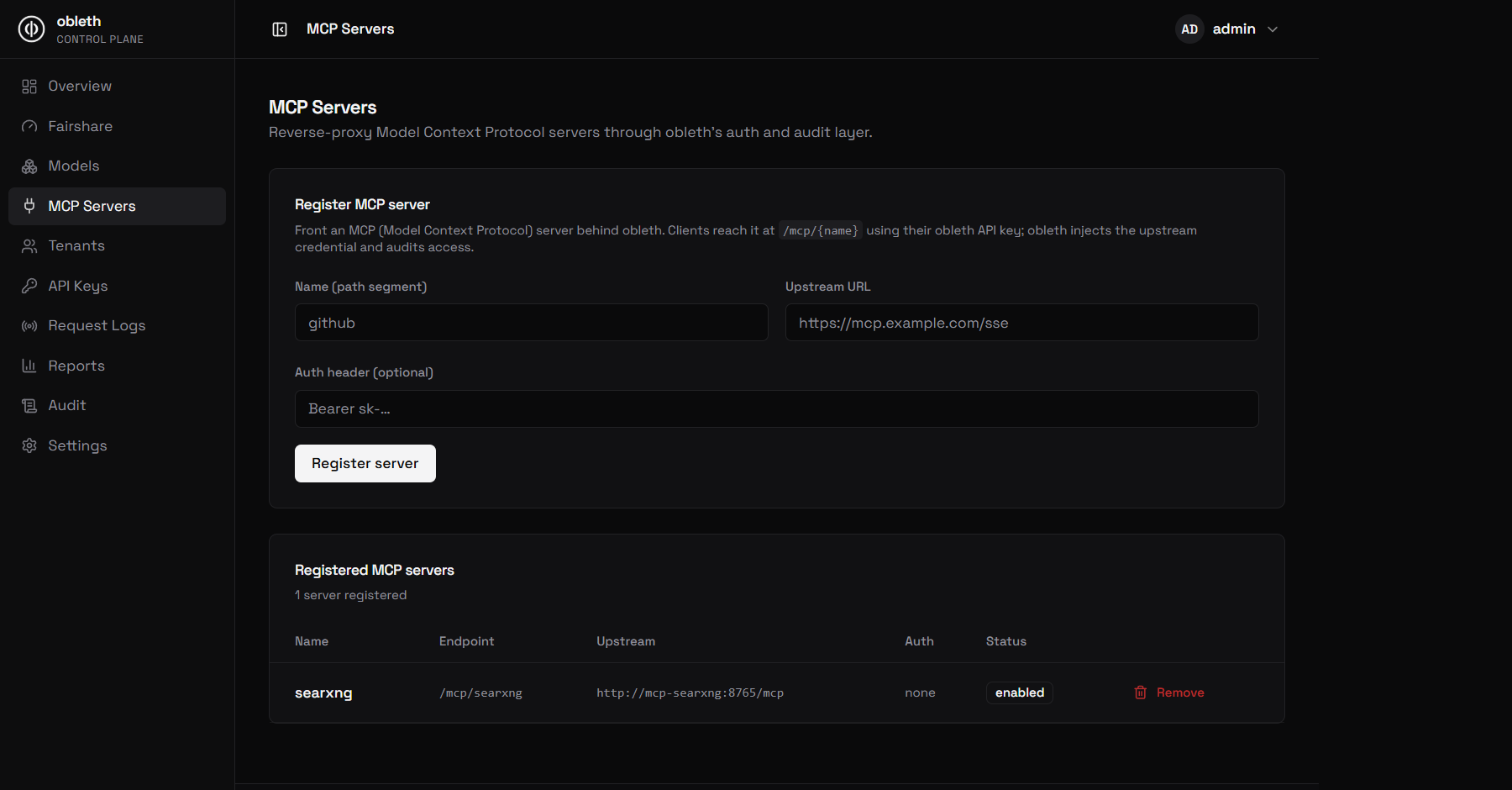
From the dashboard (MCP Servers → Register) or the Management API:
curl -X POST "${OBLETH_ADMIN_BASE_URL}/api/v1/mcp-servers" \
  -H "Authorization: Bearer $OBLETH_ADMIN_TOKEN" \
  -H "Content-Type: application/json" \
  -d '{
        "name": "github",
        "upstream_url": "https://mcp.githubcopilot.com/mcp",
        "auth_header": "Bearer ghp_…"
      }'
name— the path segment clients use:/mcp/github.upstream_url— the MCP server's base URL.auth_header— optional fullAuthorizationheader value obleth injects toward the upstream (stored encrypted-at-rest in production). Clients never see it.
Other endpoints: GET /api/v1/mcp-servers, GET/PUT/DELETE /api/v1/mcp-servers/{id}. All writes are audited and synced to every gateway
pod via Redis.
Calling through the gateway
Clients point their MCP client at obleth using their obleth API key:
POST https://{obleth-host}/mcp/github
Authorization: Bearer sk_...
Content-Type: application/json

{ "jsonrpc": "2.0", "method": "tools/list", "id": 1 }
obleth:
- authenticates the obleth API key (same keys as LLM traffic),
- resolves the registered server from its hot cache,
- strips the client's credential, injects the server's
auth_header, - reverse-proxies the request and streams the response back (JSON or SSE).
Sub-paths are supported: /mcp/{server}/{rest} forwards {rest} (and the query
string) to the upstream.
The gateway tool loop
Beyond proxying, obleth can run an MCP server's tools on a model's behalf. A client sends a plain OpenAI chat request and gets back a grounded final answer — it never sees tool definitions or tool calls. obleth discovers the granted servers' tools, injects them into the request, executes the model's tool calls against the MCP upstream, appends the results, and re-asks the model, looping (bounded) until the model answers.
client ──▶ obleth                         (plain chat request, no tools)
             │  model is granted MCP servers + native function calling
             │  inject discovered tools, add the nudge
             ├──▶ model                    "I should search…" → tool_calls
             │  execute tool calls against the MCP server(s)
             ├──▶ MCP server               tools/call → result
             │  append results, re-ask
             ├──▶ model                    (loops up to max_turns)
             │◀── final answer
client ◀─────┘                            grounded answer (no tool_calls)
To turn it on:
- Register the MCP server (above).
- Grant it to a model. In the dashboard, open the model and tick the server
under the Tools section; or via the API set
tool_serverson the model. The model must have nativesupports_function_calling— the loop is skipped (with a logged warning) for models without it. - Enable the loop globally under Settings → Model boons → Enable gateway
tool loop, or
tool_loop_enabled: trueonPUT /api/v1/settings/boons.
curl -X PUT http://localhost:9180/api/v1/models/$MODEL_ID \
  -H "Authorization: Bearer $TOKEN" \
  -H "Content-Type: application/json" \
  -d '{ "tool_servers": ["searxng"] }'
Key behaviors:
- One MCP session per server per request — a rate-limited server sees a single initialization, not one per tool call.
- Streamed live or buffered. A streaming client gets a live token stream; only the tool execution between turns pauses it. Non-streaming clients get the buffered final answer.
- Clients that bring their own
toolskeep control of them: the granted MCP tools are merged into the client's set, the gateway executes only its own tools, and any client-owned tool call is handed straight back to the client. - Fail-open. A tool error becomes a text result the model can read and recover
from; a dispatch failure returns the last completion. Hitting
max_turnsforces a final answer so a plain chat client never receives unexpectedtool_calls. - Tool-loop answers are never cached, and each model round trip is billed to
the tenant as a
tool_loopusage record.
The full configuration reference (turn limits, timeout, the tool nudge) lives in
Model Boons → The gateway tool loop.
For an end-to-end live web-search example, see examples/searxng/.
Observability
Per-call counts are exported as Prometheus metrics (server names are low-cardinality):
obleth_mcp_requests_total{server, status="2xx|4xx|5xx"}
Registry changes (create/update/delete) appear in the audit log. With OTLP
tracing enabled, each call produces an mcp_request span tagged with the server
name.
Errors
| Status | Meaning |
|---|---|
401 | missing/invalid obleth API key |
403 | key disabled, or the MCP server is disabled |
404 | no MCP server registered under that name |
502 | the upstream MCP server failed |