64 docs indexed
Quick Start
Get obleth running locally with Docker Compose, mint a tenant API key, and send an OpenAI-compatible chat completion through the gateway.
Get obleth running locally with Docker Compose, mint a tenant API key, and send an OpenAI-compatible chat completion through the gateway.
Time: ~5 minutes
Prerequisites: Docker Desktop (or Docker Engine + Compose v2)
What you are starting
obleth exposes two HTTP surfaces:
| Surface | Purpose | Auth |
|---|---|---|
| Data plane (OpenAI-compatible proxy) | Inference traffic — chat completions, streaming | Tenant API key (sk_...) |
Management API (/api/v1) | Create tenants, mint keys, adjust weights, read usage | Admin bearer token |
In production, clients hit HAProxy on port 80 (TLS termination + load balancing across obleth pods). HAProxy forwards to obleth's data-plane listener. For local dev you can use HAProxy or talk to obleth directly.
Client  →  HAProxy :80  →  obleth :8080  →  upstream (benchmark fixture / Aibrix / vLLM)
Admin   →  obleth Management API :9180
1. Start the stack
From the repo root, copy the example env file first (the stack requires OBLETH_ADMIN_TOKEN and will refuse to start without it):
cp deploy/docker/.env.example deploy/docker/.env
Then start the stack:
docker compose -f deploy/docker/docker-compose.yml --profile benchmark --profile edge --profile observability up --build -d
Wait until services are healthy (~30–60s on first build):
docker compose -f deploy/docker/docker-compose.yml ps
Host ports (Docker Compose)
| Service | URL | Notes |
|---|---|---|
| HAProxy (recommended client entry) | http://localhost | Port 80 → obleth data plane |
| obleth data plane (direct) | http://localhost:8088 | Bypasses HAProxy; maps container :8080 |
| Management API | http://localhost:9180 | Admin operations |
| Prometheus metrics | http://localhost:9091/metrics | Scraped by Prometheus |
| Control plane dashboard | http://localhost:3002 | Next.js UI |
| Benchmark fixture backend | http://localhost:8081 | Upstream only; don't call directly in normal use |
| Grafana | http://localhost:3001 | Anonymous admin enabled in dev |
| Prometheus UI | http://localhost:9090 |
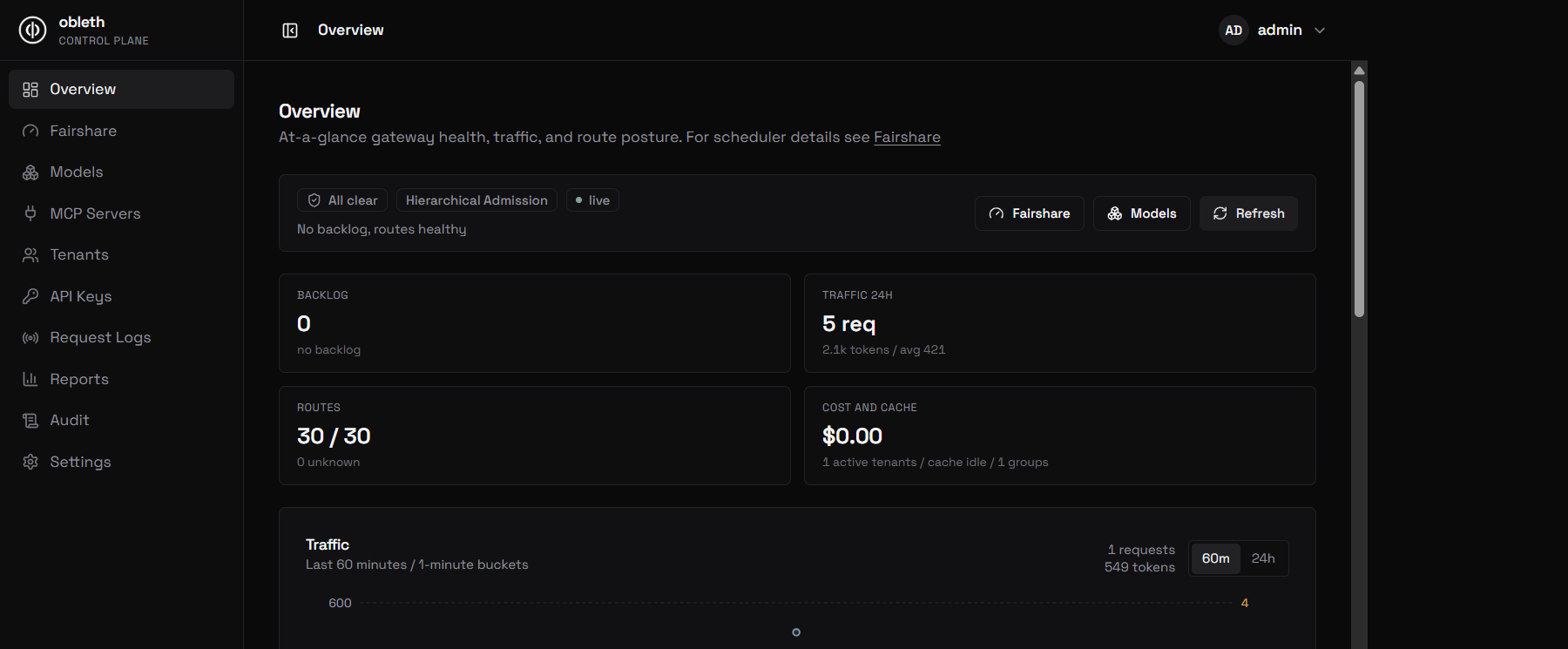
Once the stack is healthy, open the control plane dashboard at http://localhost:3002 for a live view of traffic, tenants, and models:
Verify the data plane:
curl -s http://localhost/health
# ok

curl -s http://localhost:9180/api/v1/health
# ok
2. Create a tenant and API key
The Management API uses a separate admin token (not a tenant key). The dev stack sets:
OBLETH_ADMIN_TOKEN=dev-admin-token
PowerShell (Windows)
$TOKEN = "dev-admin-token"

# Create a tenant with elevated fairshare weight
$tenant = Invoke-RestMethod -Method POST `
  -Uri "http://localhost:9180/api/v1/tenants" `
  -Headers @{ Authorization = "Bearer $TOKEN" } `
  -ContentType "application/json" `
  -Body '{"name":"chatbot","weight":500,"tokens_per_minute":2000000}'

$TID = $tenant.id

# Mint an API key (secret shown once)
$key = Invoke-RestMethod -Method POST `
  -Uri "http://localhost:9180/api/v1/tenants/$TID/keys" `
  -Headers @{ Authorization = "Bearer $TOKEN" } `
  -ContentType "application/json" `
  -Body '{"name":"prod"}'

$SECRET = $key.secret
Write-Host "API key: $SECRET"
Bash / macOS / Linux
TOKEN=dev-admin-token

TID=$(curl -s -X POST http://localhost:9180/api/v1/tenants \
  -H "Authorization: Bearer $TOKEN" \
  -H "Content-Type: application/json" \
  -d '{"name":"chatbot","weight":500,"tokens_per_minute":2000000}' \
  | jq -r .id)

SECRET=$(curl -s -X POST "http://localhost:9180/api/v1/tenants/$TID/keys" \
  -H "Authorization: Bearer $TOKEN" \
  -H "Content-Type: application/json" \
  -d '{"name":"prod"}' \
  | jq -r .secret)

echo "API key: $SECRET"
The secret looks like sk_<48 hex chars>. It is returned once; only a hash is stored in Postgres/Redis.
OpenAPI spec: http://localhost:9180/api/v1/openapi.json
3. Register the benchmark endpoint
The bundled fixture backend is exposed to clients through a normal model route. Register it once for local examples:
curl -s -X POST http://localhost:9180/api/v1/models \
  -H "Authorization: Bearer $TOKEN" \
  -H "Content-Type: application/json" \
  -d '{
    "model_name": "benchmark-endpoint",
    "description": "Bundled benchmark fixture backend for local fairshare tests",
    "upstream_model": "benchmark-endpoint",
    "api_base": "http://benchmark-backend:8081",
    "input_cost_per_token": 0,
    "output_cost_per_token": 0,
    "context_window": 8192,
    "admission_weight": 100
  }' | jq .
If it already exists, update it from the dashboard's Models page instead of creating a duplicate.
4. Call the OpenAI-compatible API
obleth proxies OpenAI-style paths to the upstream (the benchmark fixture backend in this stack). Authenticate with your tenant API key, not the admin token.
Supported auth headers (either works):
Authorization: Bearer <sk_...>x-api-key: <sk_...>
Non-streaming completion
Via HAProxy (production-like):
curl -s http://localhost/v1/chat/completions \
  -H "Authorization: Bearer $SECRET" \
  -H "Content-Type: application/json" \
  -d '{
    "model": "benchmark-endpoint",
    "messages": [{"role": "user", "content": "Hello from obleth"}],
    "max_tokens": 32
  }'
Or direct to obleth (skip HAProxy):
curl -s http://localhost:8088/v1/chat/completions \
  -H "Authorization: Bearer $SECRET" \
  -H "Content-Type: application/json" \
  -d '{
    "model": "benchmark-endpoint",
    "messages": [{"role": "user", "content": "Hello from obleth"}],
    "max_tokens": 32
  }'
Streaming (SSE)
curl -N http://localhost/v1/chat/completions \
  -H "Authorization: Bearer $SECRET" \
  -H "Content-Type: application/json" \
  -d '{
    "model": "benchmark-endpoint",
    "stream": true,
    "messages": [{"role": "user", "content": "Stream a short reply"}],
    "max_tokens": 16
  }'
Using the OpenAI Python SDK
Point the client at obleth instead of api.openai.com:
from openai import OpenAI

client = OpenAI(
    base_url="http://localhost/v1",          # HAProxy → obleth
    api_key="sk_...",                          # your tenant key
)

response = client.chat.completions.create(
    model="benchmark-endpoint",
    messages=[{"role": "user", "content": "hi"}],
    max_tokens=32,
)
print(response.choices[0].message.content)
For direct obleth access use base_url="http://localhost:8088/v1".
5. Open the dashboard
The control plane reads the Management API only (no direct DB access):
Use the same admin token (dev-admin-token) if the UI prompts for it, or manage tenants via the API.
6. (Optional) See fairshare under load
Seed two tenants with very different weights and run the benchmark harness:
PROXY_BASE=http://localhost node bench/run-benchmark.mjs
Use PROXY_BASE=http://localhost:8088 if bypassing HAProxy. See Benchmark Harness.
Endpoint cheat sheet
| What | Method | URL | Auth |
|---|---|---|---|
| Health (data plane) | GET | http://localhost/health | none |
| Chat completions | POST | http://localhost/v1/chat/completions | tenant key |
| List tenants | GET | http://localhost:9180/api/v1/tenants | admin token |
| Create tenant | POST | http://localhost:9180/api/v1/tenants | admin token |
| Mint key | POST | http://localhost:9180/api/v1/tenants/{id}/keys | admin token |
| Boost weight | PATCH | http://localhost:9180/api/v1/tenants/{id}/weight | admin token |
| Usage aggregates | GET | http://localhost:9180/api/v1/usage | admin token |
| OpenAPI | GET | http://localhost:9180/api/v1/openapi.json | none |
Common issues
401 missing bearer token / invalid api key
You are using the admin token on the data plane, or the key was never synced. Create a key via the Management API and use the sk_... secret on /v1/chat/completions.
Connection refused on :8080
Compose maps the data plane to host port 8088, not 8080. Use http://localhost (HAProxy) or http://localhost:8088 (direct).
Dashboard on :3000 does not load
The dashboard is on :3002 in this compose file.
Upstream errors
Check the benchmark fixture service: curl -s http://localhost:8081/health.
Ensure OBLETH_UPSTREAM_BASE_URL or the model route's api_base points at it
inside the compose network.
Stop the stack
docker compose -f deploy/docker/docker-compose.yml down
Add -v to remove Postgres/Redis/ClickHouse volumes.
Next steps
- Installation — Helm, production topology
- Fairshare engine — how weighted admission works
- OpenAI-compatible API guide — streaming, models, headers
- HAProxy front door — TLS, multi-pod routing