64 docs indexed
Capacity Auto-tune
Find each model's in-flight knee with a bounded ramp probe, then apply the recommended max_in_flight slots from the dashboard or Management API.
Each registered model can carry its own max_in_flight slot cap — an optional ceiling on concurrent requests for that route, inside the global fairshare scheduler limit (OBLETH_GLOBAL_MAX_IN_FLIGHT). Auto-tune helps you set that cap for self-hosted chat and embedding models by driving real load directly at the upstream and measuring where throughput stops climbing or tail latency breaches your SLO.
Cloud-hosted models should stay on a static cap so spend stays bounded. Auto-tune is intentionally recommend-only: the probe never writes config; you apply the suggestion explicitly.
From the dashboard, open a chat or embedding model and switch to its Capacity tab to set the admission weight, capacity mode (static/tuned), max-slot cap, and to launch the auto-tune probe:
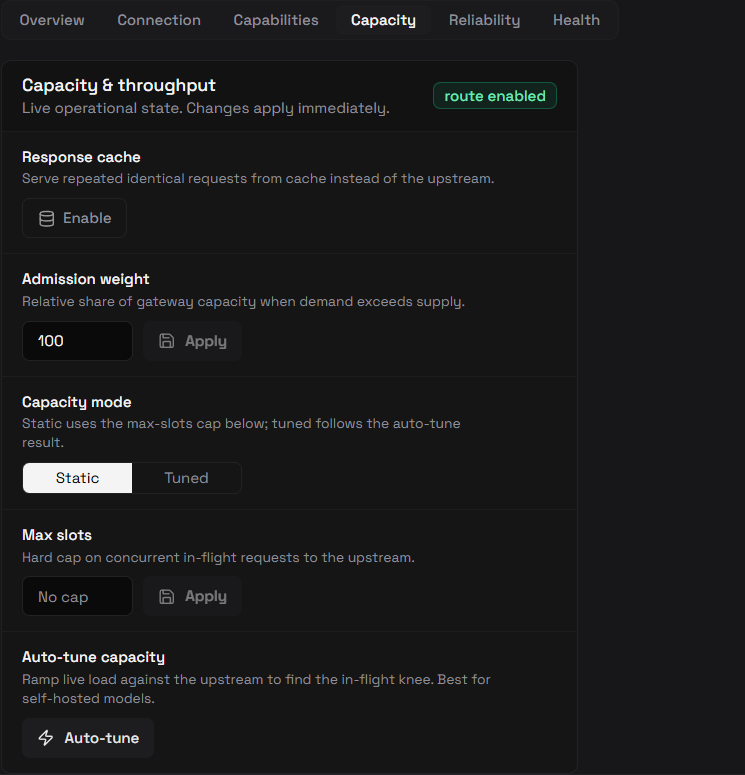
Static vs tuned
| Mode | Meaning |
|---|---|
static (default) | max_in_flight is operator-set. Use for cloud APIs and any model where you want a fixed spend/concurrency ceiling. |
tuned | max_in_flight was last written by auto-tune. capacity_tuned_at records when. You can flip back to static at any time without clearing the slot value. |
Both modes use the same max_in_flight field. The mode is metadata for operators and audit — it does not change admission behavior on the data plane.
How the probe works
The ramp probe runs in the Management API (obleth-admin). For each step it:
- Sends real requests directly to the model's
api_base, bypassing obleth's gateway admission, so the measurement reflects the upstream's true capacity rather than the gateway's current cap. - Steps concurrency up a geometric ladder: 1 → 2 → 4 → 8 → … up to your
max_concurrency(hard ceiling 256). - Sustains each level for 2.5 seconds, recording sustained throughput (successful rps), p50, and p99 of total request time.
- Stops at the first knee:
- SLO breach — a step's p99 exceeds
target_p99_ms - Plateau — throughput gain vs the previous step falls below ~7%
- Max concurrency — reached the ceiling without a clear knee (the real knee may be higher)
- No data — every step failed (upstream unreachable)
- SLO breach — a step's p99 exceeds
The recommended max_in_flight is the highest concurrency that stayed under the SLO while still meaningfully improving throughput.
Safety caps
| Limit | Value |
|---|---|
| Wall clock | ≤ 60 seconds (all steps combined) |
| Total requests | ≤ 20,000 |
| Max concurrency | ≤ 256 (regardless of request) |
| Chat probe size | max_tokens: 8, non-streaming |
| Supported modalities | chat, embedding only |
Defaults when omitted: target_p99_ms = 2000, max_concurrency = 64.
Management API
All three routes are audit-logged. See Management API — Models for the full listing.
Set capacity mode
curl -X PUT "http://localhost:9180/api/v1/models/$MODEL_ID/capacity-mode" \
  -H "Authorization: Bearer $TOKEN" \
  -H "Content-Type: application/json" \
  -d '{"capacity_mode": "static"}'
Run probe (recommend only)
curl -X POST "http://localhost:9180/api/v1/models/$MODEL_ID/autotune" \
  -H "Authorization: Bearer $TOKEN" \
  -H "Content-Type: application/json" \
  -d '{"target_p99_ms": 2000, "max_concurrency": 64}'
Example response (truncated):
{
  "model_id": "...",
  "model_name": "qwen3-8b",
  "modality": "chat",
  "recommended_max_in_flight": 32,
  "knee_reason": "slo_breach",
  "target_p99_ms": 2000,
  "max_concurrency": 64,
  "recommended_throughput_rps": 18.4,
  "duration_ms": 12400,
  "steps": [
    {
      "concurrency": 16,
      "throughput_rps": 17.2,
      "p50_ms": 420,
      "p99_ms": 890,
      "requests": 430,
      "errors": 0
    },
    {
      "concurrency": 32,
      "throughput_rps": 18.4,
      "p50_ms": 510,
      "p99_ms": 1120,
      "requests": 460,
      "errors": 0
    }
  ]
}
Apply recommendation
curl -X POST "http://localhost:9180/api/v1/models/$MODEL_ID/autotune/apply" \
  -H "Authorization: Bearer $TOKEN" \
  -H "Content-Type: application/json" \
  -d '{"max_in_flight": 32}'
This sets max_in_flight, flips capacity_mode to tuned, stamps capacity_tuned_at, syncs the data plane, and records an audit entry. You can also apply a value from a saved probe report without re-running the probe.
Control plane
On the Models page, expand a chat or embedding route:
- Capacity mode —
Static/Tunedtoggle in operational controls (callsPUT …/capacity-mode). - Max slots — manual
max_in_flighteditor (callsPUT …/capacity). - Auto-tune capacity panel — opens a dialog that warns about live upstream load and token cost, takes target p99 and max concurrency, runs the probe, shows the recommendation plus a per-step curve table (knee row highlighted), and offers one-click Apply.
The auto-tune panel is hidden for non-probeable modalities (image, audio_*, etc.).
When to use it
| Scenario | Recommendation |
|---|---|
| Self-hosted vLLM / Aibrix / local OpenAI-compatible server | Run auto-tune during a quiet window, then apply. Re-run after hardware or replica changes. |
| OpenAI, Together, or other metered cloud APIs | Keep static and set a conservative max_in_flight manually to cap spend. |
| Production model under heavy traffic | Avoid probing during peak — the probe adds real concurrent load at the upstream. |
| After apply | Confirm obleth_queue_depth stays near zero and GPU/backend utilization looks healthy. |
Per-model slots sit inside the global scheduler cap. Effective admission is the minimum of global max_in_flight, per-model slots, tenant/group limits, and fairshare. See Capacity Provider and Scaling.