64 docs indexed
API Keys
How to mint, list, disable, and delete tenant API keys, and how obleth stores them securely.
API keys are the credentials clients use to authenticate with the obleth data plane. Every key belongs to exactly one tenant and inherits that tenant's weight, quota, and fairshare group.
How obleth stores keys
obleth never stores the raw secret. When a key is created:
- A cryptographically random secret is generated (
sk_+ 48 random hex characters). sha256(secret)is stored in Postgres (api_keys.key_hash).- A display-only prefix (e.g.
sk_a1b2c3d4e5f6a1b) is stored for dashboards. - The
ResolvedKey(tenant details + weight + quota) is synced to Redis atobleth:key:{hash}.
The raw secret is returned once in the creation response. If you lose it, the only option is to delete the key and create a new one.
Creating a key
From the dashboard, click New key on the API Keys page to mint a key for any tenant. You can set an optional name, description, and per-key token/cost budget; the raw secret is shown once on the success screen.
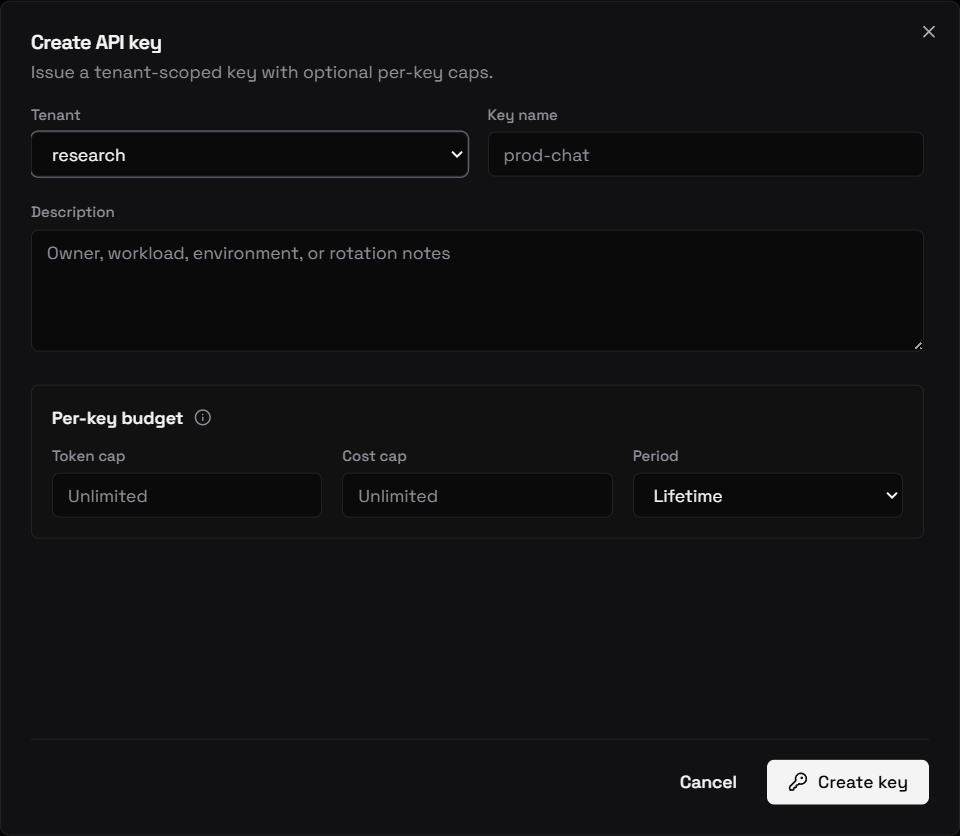
Or create one via the Management API:
curl -X POST http://localhost:9180/api/v1/tenants/$TID/keys \
  -H "Authorization: Bearer $TOKEN" \
  -H "Content-Type: application/json" \
  -d '{"name": "prod"}'
Response:
{
  "key": {
    "id": "...",
    "tenant_id": "...",
    "name": "prod",
    "key_prefix": "sk_a1b2c3d4e5f6a1b",
    "disabled": false,
    "created_at": "2026-01-15T10:00:00Z"
  },
  "secret": "sk_a1b2c3d4e5f6..."
}
Listing keys for a tenant
# All keys for a specific tenant
curl http://localhost:9180/api/v1/tenants/$TID/keys \
  -H "Authorization: Bearer $TOKEN"

# All keys across all tenants (with optional filters)
curl "http://localhost:9180/api/v1/keys?limit=50" \
  -H "Authorization: Bearer $TOKEN"
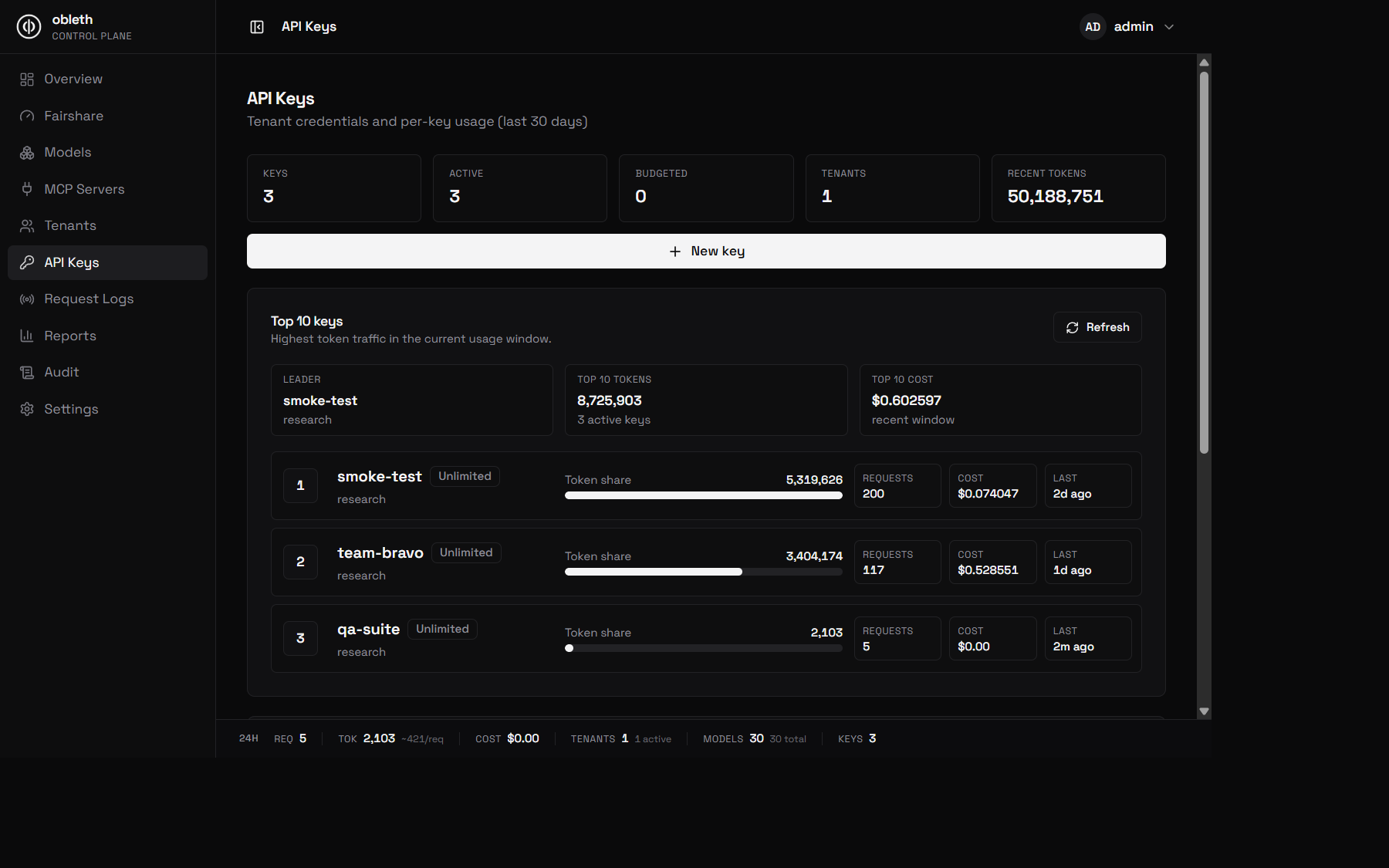
Checking key usage and last-used time
To see when a key was last used, what it last called, and its recent volume, query the per-key usage summary. This is computed in ClickHouse, so you never have to page through the request log to find a key's last activity:
curl "http://localhost:9180/api/v1/keys/$KEY_ID/usage" \
  -H "Authorization: Bearer $TOKEN"
# -> { "last_used_ms": 1749427821000, "last_model": "gemma4-31b-it",
#      "last_status_code": 200, "requests": 142, "total_tokens": 99800, "cost_usd": 1.24 }
last_used_ms is 0 for a key that has never been used (within the ledger's
retention window). The requests / *_tokens / cost_usd totals cover a
rolling window (since_ms, default last 24h). For a fleet-wide view — e.g. to
find stale keys — use the bulk form GET /api/v1/usage/keys/summary, which the
dashboard Keys page uses for its Last used column. See the
Management API reference.
Disabling a key
Disabling a key immediately prevents it from authenticating without deleting the key's audit history:
curl -X PUT http://localhost:9180/api/v1/keys/$KEY_ID/disabled \
  -H "Authorization: Bearer $TOKEN" \
  -H "Content-Type: application/json" \
  -d '{"disabled": true}'
The change is synced to Redis and invalidated in moka across all pods. The key returns 403 api key disabled immediately on the next request.
Re-enable:
curl -X PUT http://localhost:9180/api/v1/keys/$KEY_ID/disabled \
  -H "Authorization: Bearer $TOKEN" \
  -H "Content-Type: application/json" \
  -d '{"disabled": false}'
Deleting a key
curl -X DELETE http://localhost:9180/api/v1/keys/$KEY_ID \
  -H "Authorization: Bearer $TOKEN"
This removes the key from Postgres and Redis. The audit log retains the deletion event. Any client using the deleted key will receive 401 invalid api key.
Key rotation best practice
To rotate a key with zero downtime:
- Create a new key:
POST /api/v1/tenants/$TID/keys - Update your application to use the new secret.
- Verify the new key works.
- Delete the old key:
DELETE /api/v1/keys/$OLD_KEY_ID
Don't use disable+enable for rotation — just create a new one and delete the old.
Multiple keys per tenant
A tenant can have many keys. All keys for the same tenant share the same weight and quota. Useful patterns:
- One key per environment:
prod,staging,ci - One key per application:
chatbot,search,summarizer - One key per downstream app or team if you're building a multi-tenant deployment on top of obleth
Usage in ClickHouse is recorded per key_id, so you can break down cost by key even within the same tenant.