64 docs indexed
Slurm Provisioning
Run obleth-managed models on a Slurm HPC cluster: configure the optional obleth-provisioner plugin, define per-model Slurm specs, and build Apptainer images for your inference servers.
The Slurm provisioner is an optional plugin service — obleth-provisioner — that keeps managed models alive on a preemptible Slurm cluster. It submits batch jobs via slurmrestd, probes replicas for health, and promotes each healthy replica into obleth's model endpoint pool so the gateway routes traffic to it automatically.
The provisioner is not part of the obleth core stack. You opt in via config — add slurm to COMPOSE_PROFILES in your .env — after which it builds and starts with the same single command as the rest of the stack (or run the binary yourself).
How it works
Every reconcile tick (OBLETH_PROVISIONER_INTERVAL_SECS, default 15s):
- Read Slurm settings from the Management API. If Slurm is not globally enabled, the tick is skipped.
- List enabled managed models via the Management API.
- List owned Slurm jobs from
slurmrestd, identified by a job-name prefix. - For each managed model: probe starting replicas, submit new jobs when below target, promote healthy replicas into the endpoint pool, mark lost replicas (preempted/finished), cancel excess jobs.
- Drain models that left the managed set — cancel jobs, detach endpoints, GC rows.
- Cancel orphan jobs — any cluster job matching the prefix with no tracking row.
If either the Management API or slurmrestd is unreachable the tick bails out without taking any destructive action; it retries on the next tick.
Prerequisites
Before enabling the provisioner, verify that your cluster has:
slurmrestdrunning and reachable from the provisioner. The provisioner authenticates withX-SLURM-USER-NAME+X-SLURM-USER-TOKENheaders; no username/password login is used.apptainer(orsingularity) installed on all compute nodes. Jobs run asapptainer exec --nv <image> <launch_command>. The--nvflag passes NVIDIA GPU devices through; Apptainer must be able to find it on the job'sPATH(/opt/apptainer/binand/opt/singularity/binare included in the job's defaultPATHautomatically).- A Slurm JWT for authentication. Generate one on your Slurm head node with
scontrol token, or via your cluster's token service. Paste the raw JWT into the dashboard — it is encrypted at rest with the gateway'sOBLETH_ENCRYPTION_KEY. - Shared storage accessible by all nodes. The Apptainer
.sifimage file must be reachable by all nodes that could run the job (NFS, Lustre, GPFS, etc.). The path you give in theimagefield is used as-is on every compute node.
Step 1: Start the provisioner
Docker Compose
The provisioner is gated behind the slurm profile. Opt in via config by adding slurm to COMPOSE_PROFILES in deploy/docker/.env (copy it from .env.example if you haven't):
# deploy/docker/.env
COMPOSE_PROFILES=benchmark,edge,observability,slurm
Then one command — run from deploy/docker/, with no -f flags — builds and starts everything, the provisioner included:
cd deploy/docker

docker compose up -d --build      # build + start the whole stack (provisioner too)
docker compose down               # tear it all down
Running from deploy/docker/ lets Compose auto-load .env (so the profile activates) and auto-merge a local docker-compose.override.yml if you use one (see Troubleshooting). No --profile flag and no extra -f arguments are needed. The container only needs OBLETH_ADMIN_TOKEN (inherited from the core stack's .env) and OBLETH_ADMIN_BASE_URL; Slurm connection details are configured in the dashboard, not in .env.
Note:
If you pass explicit -f paths (e.g. running docker compose -f deploy/docker/docker-compose.yml … from the repo root), Compose stops auto-loading .env profiles and stops auto-merging docker-compose.override.yml. Prefer running from deploy/docker/ so the single command Just Works.
systemd
A unit file ships at deploy/systemd/obleth-provisioner.service. Put env vars in /etc/obleth/provisioner.env, then:
sudo cp deploy/systemd/obleth-provisioner.service /etc/systemd/system/
sudo cp obleth/target/release/obleth-provisioner /usr/local/bin/
sudo systemctl daemon-reload
sudo systemctl enable --now obleth-provisioner
Cargo (development)
OBLETH_ADMIN_TOKEN=dev-admin-token \
OBLETH_ADMIN_BASE_URL=http://localhost:9180 \
cargo run -p obleth-provisioner
Step 2: Configure Slurm system settings
Open the dashboard → Settings → Slurm.

| Field | Description |
|---|---|
| Enable Slurm | Master switch. The provisioner idles until this is on. |
| slurmrestd URL | Base URL of your slurmrestd, e.g. http://slurm-head.cluster.local:6820. Required when enabled. |
| API version | slurmrestd API version segment, e.g. v0.0.40. Match this to the version your cluster exposes at /openapi/v3. Default v0.0.40. |
| Slurm user | The Slurm username whose JWT you are using. Required when enabled. |
| JWT | The raw Slurm JWT. Write-only: leave blank when saving to keep the stored value. Encrypted at rest with OBLETH_ENCRYPTION_KEY. |
After saving, click Test connection to verify:
- JWT health — whether a JWT is set, whether it is expired, and when it expires.
- slurmrestd ping — whether the
GET /slurm/{version}/pingendpoint responds with 2xx and how fast.
The provisioner reads these settings from the Management API on every tick, so changes take effect within one interval without a restart.
The Settings → Slurm tab also shows whether the provisioner process is currently running and, when the provisioner reports it, its version (and short commit). Because the provisioner ships as its own image and is deployed separately from the gateway, this makes a stale provisioner deployment obvious at a glance.
Note:
slurmrestd version: if job submissions fail with schema/validation errors, compare the payload in obleth/crates/obleth-provisioner/src/slurm.rs against your cluster's /openapi/v3 schema and update the API version field to match.
Step 3: Create a Slurm-provisioned model
When creating a model in the dashboard → Models → New model, choose Slurm provisioned as the hosting mode. This choice is made at creation time — you cannot change it after creation.
Slurm-provisioned models have no static upstream endpoint. The provisioner registers replicas dynamically as they become healthy, so you do not provide api_base or api_key during creation.
Apptainer image requirements
The provisioner submits a Slurm batch script that runs:
#!/bin/bash
set -euo pipefail
apptainer exec --nv <image> <launch_command>
<image>— the path to an Apptainer.sifimage on shared cluster storage. This path is used verbatim on each compute node, so all nodes must be able to read it.<launch_command>— the inference server startup command to run inside the container, e.g.python -m vllm.entrypoints.openai.api_server --model /data/models/llama3 --port 8080.--nv— passes NVIDIA GPU devices through to the container. Remove this flag fromlaunch_commandif you are not using GPUs.
Building an Apptainer image for vLLM:
# Pull the vLLM Docker image and convert it to a .sif
apptainer pull vllm.sif docker://vllm/vllm-openai:latest

# Or build from a definition file for a custom environment
apptainer build vllm-custom.sif vllm.def
Place the .sif on your cluster's shared filesystem (NFS, Lustre, GPFS) and use that path as the image field in the model spec.
Image checklist:
- The inference server must listen on the port you set in
serving_port. - It must respond to HTTP
GET <health_path>with a 2xx when healthy (used by the provisioner's health probe). - GPU drivers are injected at runtime by
--nv; you do not need to bundle CUDA in the image (though bundling it is fine too). - If your cluster uses a module system (
module load apptainer), make sureapptaineris on the defaultPATHfor batch jobs, or prepend the load command tolaunch_command.
Managed model spec fields
The spec is set via the Provisioning tab on the model detail panel (or directly via the Management API PUT /api/v1/models/{id}/managed).
| Field | Required | Default | Description |
|---|---|---|---|
partition | yes | — | Slurm partition to submit to |
gres | no | "" | Generic resource spec, e.g. gpu:a100:1 |
nodes | no | 1 | Node count per replica |
image | yes | — | Path to the Apptainer .sif on shared storage |
preamble | no | "" | Shell lines injected before apptainer exec in the batch script. Use to load modules or extend PATH, e.g. module load apptainer/1.3.4. Supports multiple lines. |
launch_command | yes | — | Command run inside the container, e.g. python -m vllm.entrypoints.openai.api_server --model /data/models/llama3 --port 8080 |
serving_port | yes | — | Port the inference server listens on inside the job |
health_path | no | /health | HTTP path used to probe replica health |
target_replicas | no | 2 | Number of replicas to keep alive |
account | no | — | Slurm account for billing |
qos | no | — | Quality-of-service class |
time_limit | no | — | Job time limit in Slurm format, e.g. 4:00:00 |
constraints | no | — | --constraint filter, e.g. a100 |
exclude | no | — | Comma-separated list of nodes to exclude |
enabled | no | true | Toggle without deleting the spec. Disabling drains replicas to zero. |
Monitoring replicas
On the model detail panel, the Provisioning tab appears only for Slurm-provisioned models. It shows:
- Edit provisioning spec — change partition, GRES, image, launch command, replica count, etc.
- Replica panel — live table of each replica: state (
starting,healthy,lost), node, Slurm job ID.
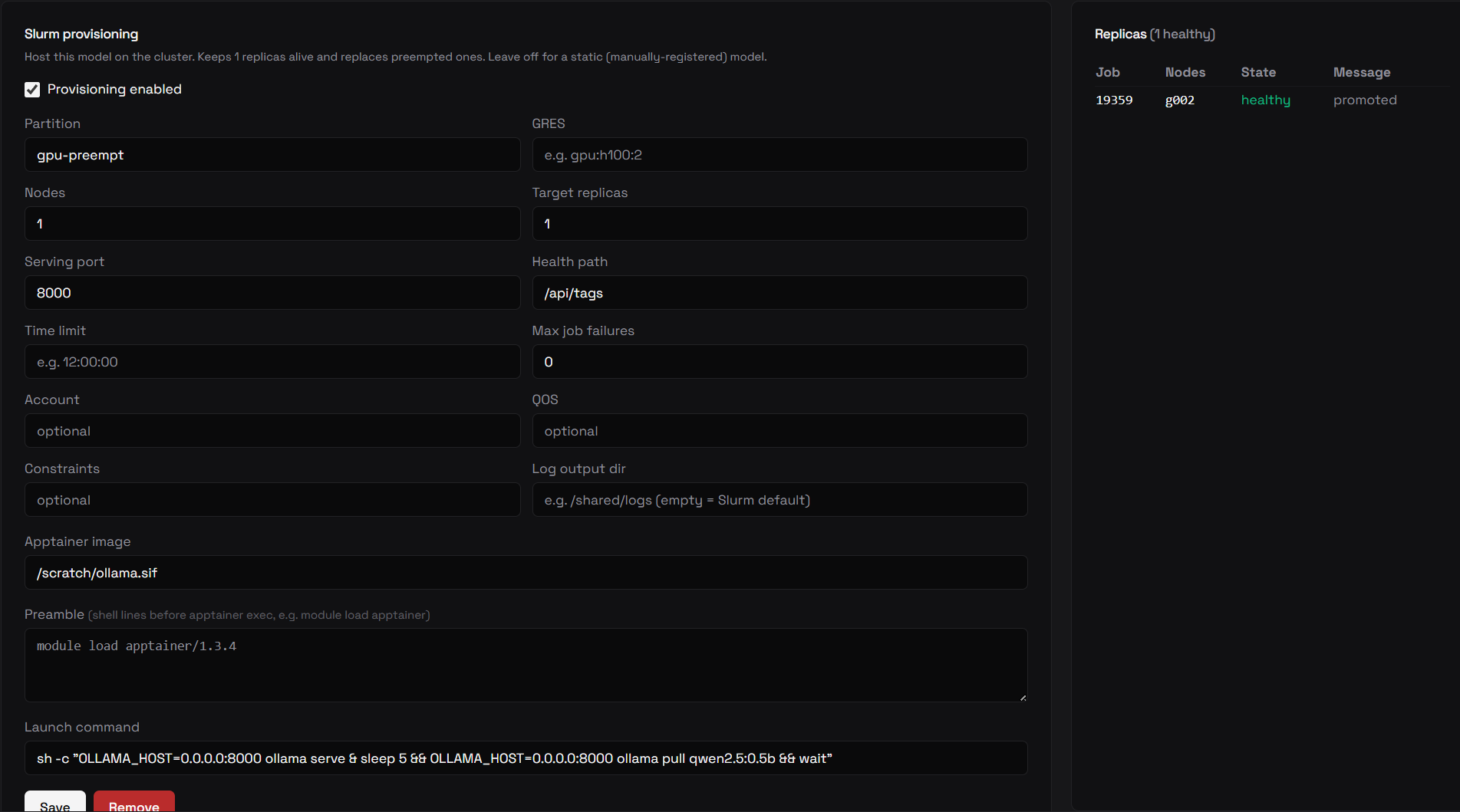
Replicas transition through states automatically:
starting— job submitted, not yet health-probedhealthy— health probe passed; the replica is in the endpoint poollost— job preempted or gone; the endpoint is detached and a new job will be submitted on the next tick
Warmup on promotion
A replica passes its health check as soon as the inference server answers
/health, but its first request can still be slow — the model has to do its
first forward pass (graph capture, cache warmup), which on a cold box can take
long enough to surface to a user as a 502/504. To avoid that, the provisioner
fires one throwaway request at each replica right after it is promoted, so the
cold first-token cost is paid by the gateway instead of by the first real user.
Warmup is on by default. Tune or disable it with
OBLETH_PROVISIONER_WARMUP_TIMEOUT_SECS (default 600s; 0 disables) — see
Environment Variables.
Restarting a replica
Each Slurm-backed endpoint has a Restart action on the model's Reliability tab: it cancels that replica's Slurm job, and the provisioner launches a fresh one to hold the target count. Static (non-managed) endpoints are unaffected. Cancelling a replica deregisters its endpoint before the job is killed, so it leaves the routing pool immediately rather than serving a few more requests into a dying process.
Endpoints and the OpenAI /v1 root
When a replica passes its health probe, the provisioner registers it as a model endpoint with api_base = http://<node>:<serving_port>/v1. The /v1 root matches the convention used by every statically-registered model and the model health check, which appends /models to a model's api_base expecting …/v1/models. OpenAI-compatible inference servers (vLLM, SGLang, LiteLLM, Ollama) all serve their OpenAI surface under /v1.
This is distinct from the provisioner's own liveness probe, which uses the spec's health_path (e.g. Ollama's native /api/tags, or vLLM's /health) against the bare node — it does not assume /v1.
How model health is shown for Slurm models
A Slurm-provisioned model has no static api_base — its live URL lives in the endpoint pool, which changes as replicas come and go. So the model-level health badge is derived from the endpoint pool, not from a single static base:
- healthy — at least one live endpoint is healthy
- degraded — no healthy endpoints, but at least one is degraded (e.g. reachable but not yet advertising the model)
- unhealthy — every live endpoint is down, or there are no live endpoints
A replica can be promoted to healthy (the provisioner reached it) while the model badge still shows unhealthy if the gateway cannot reach the endpoint — the two checks run from different places. See Troubleshooting.

Troubleshooting
A job reaches RUNNING but the replica never becomes healthy
There are two independent health checks, and a replica is only promoted when the provisioner's probe passes:
-
Provisioner probe (promotes the replica). Each tick the provisioner does
GET http://<node>:<serving_port><health_path>from wherever the provisioner runs (its container or host — not from the compute node). The replica is promoted only on a2xx. Every attempt is logged:health probe ... api_base=http://gpu7:8000 healthy=falsehealthy=falsealmost always means the provisioner cannot reach the node, not that the model is down. Acurlthat works on the node itself proves nothing — the probe originates from the provisioner. Verify reachability from inside the provisioner container:getent hosts gpu7 # name resolves? curl -s -o /dev/null -w '%{http_code}\n' http://gpu7:8000/api/tags # port reachable?If the log instead says
job is RUNNING but slurmrestd returned no nodes, that is a different problem —slurmrestdis not returning the allocated nodelist. Check that your API version matches/openapi/v3. -
Model health check (the red/green badge). This runs in the gateway (
obleth) container against the registered endpoints, so the gateway also needs to reach<node>:<serving_port>. This is why a replica can behealthywhile the model badge is stillunhealthy.The model detail Health tab shows the probe history — handy for spotting a model that has just started recovering. In the run below the endpoint was registered before the
/v1fix, so the gateway probes returnedunhealthy(HTTP—,0 ms) until a fresh promotion moved it todegraded: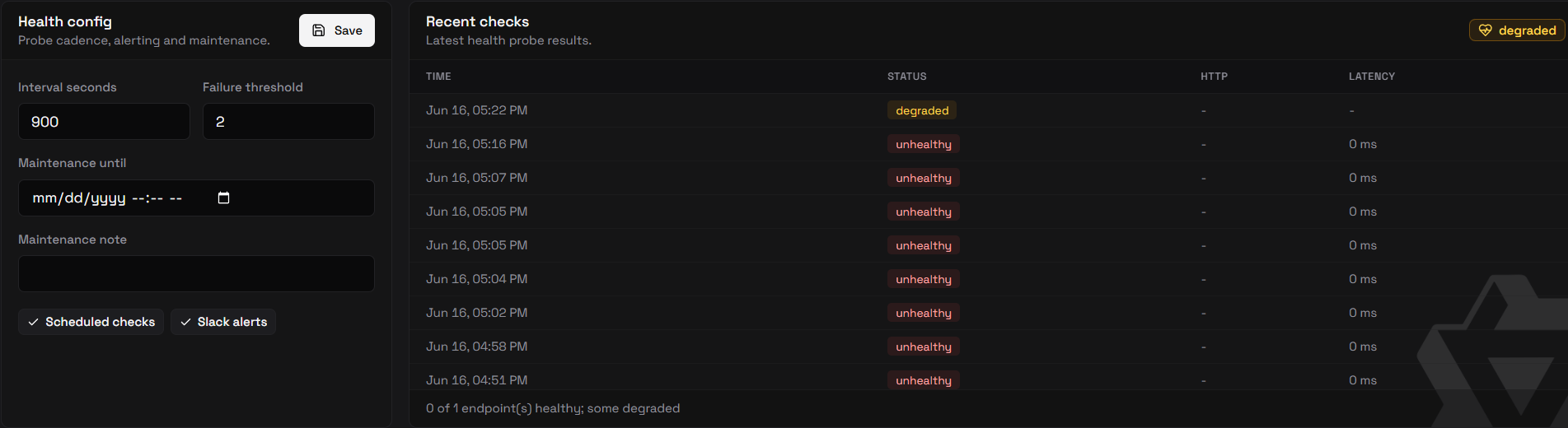
Giving containers a route to cluster nodes
When you run the stack in Docker on a workstation, both the provisioner and the gateway need to resolve and route to your cluster node hostnames. Add a gitignored deploy/docker/docker-compose.override.yml so no node IPs land in git, and put extra_hosts on both services:
services:
  obleth-provisioner:
    extra_hosts:
      - "gpu7:10.0.0.24"        # real routable IP of the node
  obleth:                        # the model health check + data plane need it too
    extra_hosts:
      - "gpu7:10.0.0.24"
Run the single command from deploy/docker/ (docker compose up -d --build) and the override is auto-merged. extra_hosts is applied at container-create time, so recreate the containers to pick it up (--force-recreate if Compose thinks they are current).
Note:
extra_hosts only fixes name→IP resolution; the container must still be able to route to that IP (same LAN/VPN). On Docker Desktop, arbitrary LAN cluster hosts are often unreachable — in that case run the provisioner on a login/head node via systemd instead.
A promoted replica was registered before the /v1 fix
Promotion only creates an endpoint; it never rewrites an existing one. A replica promoted by an older provisioner keeps its pre-/v1 api_base until a fresh promotion. To refresh it, force a new replica — toggle the model's provisioning off and back on, or set target_replicas to 0 then back — so the next promotion registers at the /v1 root.
Disabling Slurm globally vs per model
| Scope | Effect |
|---|---|
| Dashboard Settings → Slurm enabled = off | Provisioner idles; does not drain existing replicas. v1 limitation — drain-on-global-disable is planned. |
Per-model enabled = false | Replicas drained to zero; jobs cancelled; endpoints detached. The spec is kept and the model can be re-enabled later. |
Delete managed spec (DELETE /api/v1/models/{id}/managed) | Same drain behavior as disabling, but the spec is removed. |
v1 limitations
- Fixed serving port per model. All replicas of a model serve on the same port. There is no replica self-registration yet.
- Single-node health probe. The health probe targets the first node of a job. Multi-node nodelist bracket-ranges (e.g.
gpu[01-04]) are not expanded. - No autoscaling.
target_replicasis a fixed count. The provisioner only maintains it and replaces preempted jobs — it does not scale based on load. - Global disable does not drain. Turning off the master switch idles the provisioner without cancelling existing Slurm jobs. Per-model disable does drain.
Management API
| Method | Path | Description |
|---|---|---|
GET | /api/v1/managed | List all managed model specs |
GET | /api/v1/models/{id}/managed | Get the managed spec for one model |
PUT | /api/v1/models/{id}/managed | Create or update a managed spec |
DELETE | /api/v1/models/{id}/managed | Remove the spec (triggers drain) |
GET | /api/v1/replicas | List all replicas |
GET | /api/v1/models/{id}/replicas | List replicas for one model |
Slurm system settings (see also Management API reference):
| Method | Path | Description |
|---|---|---|
GET | /api/v1/settings/slurm | Current settings (JWT masked) |
PUT | /api/v1/settings/slurm | Update settings |
POST | /api/v1/settings/slurm/test | Test connection: JWT expiry + slurmrestd ping |
GET | /api/v1/settings/slurm/resolved | Full settings with decrypted JWT (provisioner-internal) |